Enquiries are under Sales → Enquiries. Everything a visitor asks lands in one inbox: a callback, a question about a product or an order, “tell me when it is back”, a message from the contact page, a return, and enquiries from your own forms. One inbox, not four, because one person usually answers them, and a quiet inbox otherwise goes unread for a month.
What a shop has from the start
- A callback on every storefront page. It opens from a link to
#enquiry-callbackor the{callback_link}token in an HTML block. - Ask about this product under the buy button, and Tell me when it is back on products that really are out of stock.
- The “Enquiry form” block for any zone: a contact page is a page with this block.
- Three letters, with nothing to set up: a new enquiry to the shop, the shop’s answer to the customer, the customer’s reply to the shop.
A customer signed in to their account is not asked who they are: instead of the fields the form says “We will reply to: name · email” from the account, and Other contacts opens the fields when the answer should go elsewhere.
The queue
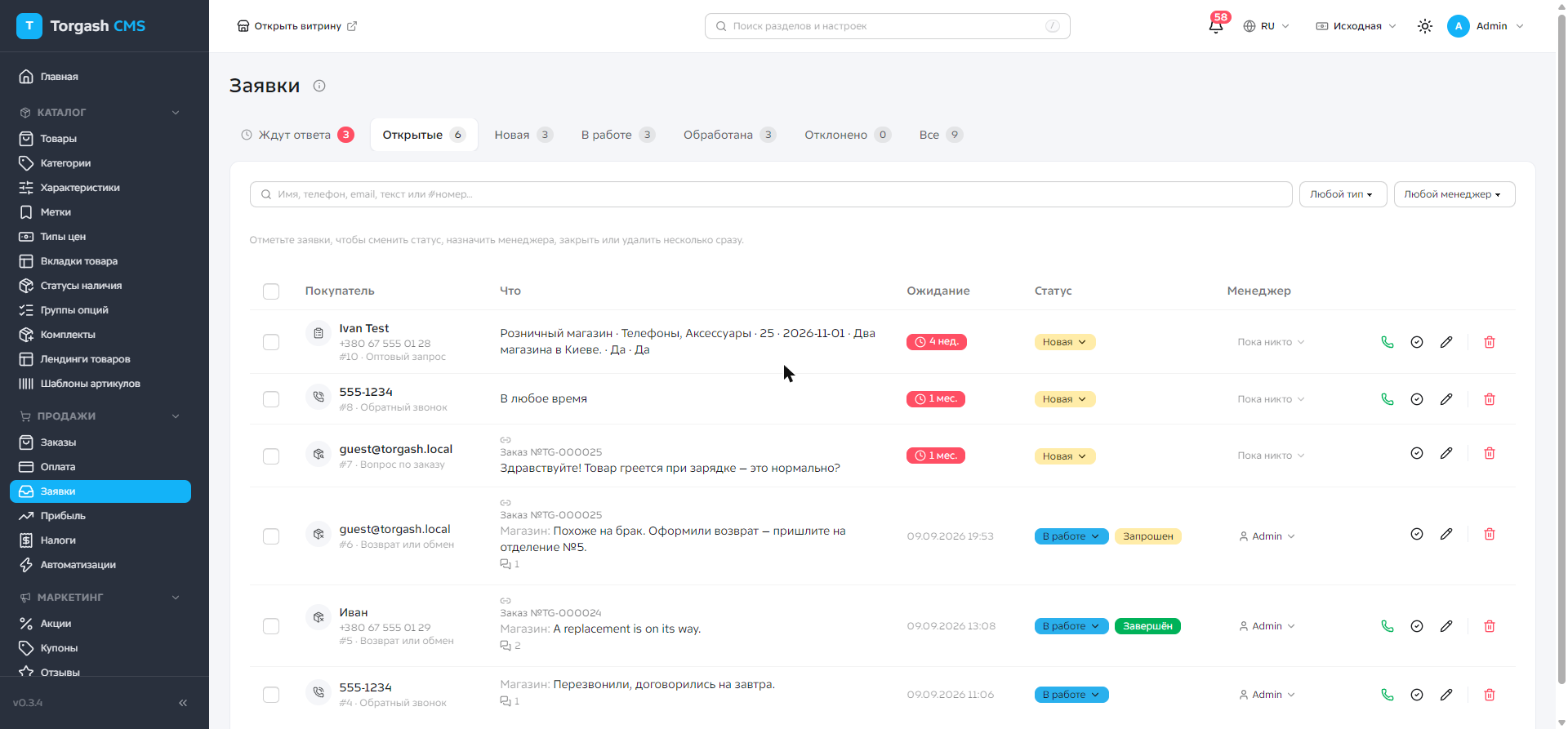
The list opens on the still open enquiries, new and in progress, not on the archive of everything ever answered. The Awaiting a reply tab holds the enquiries where the customer spoke last: the real queue of work. Then tabs by status: new, in progress, done, rejected, all.
Search finds a name, a phone, an email, text and a number like #10. Beside it, filters by kind and by manager: “mine”, “nobody yet” or a particular person.
In a row: who wrote, the gist (the enquiry’s fields or the latest message), waiting time and status. The waiting time turns red once an enquiry waits longer than the shop promised to answer within: the Answer within, hours setting. On the right: call, close as resolved, open, delete.
Tick several to change their status, give them to a manager, close or delete them at once.
An enquiry and its conversation
An enquiry’s screen is a conversation. At the top, What they asked: the enquiry’s fields under the labels they were asked with, in the visitor’s language. Below, the conversation, the shop’s messages and the customer’s in the order they happened, and the reply box with photos.
An enquiry keeps a snapshot of the visitor’s basket at that moment: names, quantities and prices. The manager’s first question, “what were they looking at?”, cannot be answered any other way afterwards.
A reply does more than write a message:
- it goes to the customer by email in their language, quoting the original question; Reply-To is the shop;
- a new enquiry becomes in progress;
- an enquiry with no manager goes to whoever answered;
- the time of the first answer is stamped once and shown under Where it came from.
When the person left only a phone number, with no email and no account, nobody would read an emailed reply. The reply box then becomes What was agreed on the phone: ring them and write down the outcome; only the shop sees it.
On the right, Handling: status, manager and a comment only the shop sees. This customer lists their other enquiries. Next in the queue opens the next enquiry awaiting a reply.
The customer’s account
A signed-in customer has Enquiries in their account: their threads and a box to reply. A thread with an answer they have not opened is marked “New answer”, with a count beside the menu item on every page.
A customer sees their enquiries by account, not by email address. A guest enquiry left under an address somebody registers with a month later stays a guest’s: an email address does not prove it is the same person.
How an enquiry ends
Question resolved marks the enquiry answered and closes it: neither the customer nor the shop can write into it any more. A done enquiry that is not closed takes messages for ever, and then a year later somebody writes into a thread whose context nobody remembers. A rejected enquiry closes by itself. Reopen brings it back.
The Close an answered enquiry after, hours setting closes the threads where the shop spoke last and the customer said nothing. A thread where the customer spoke last it never closes: that is an unanswered question. It starts at 0, nothing closes by itself.
Photos
The enquiry and every reply can carry photos: the fault, the crushed box, the label on the parcel. How many is the Photos a customer may attach setting; 0 turns attachments off in every form at once.
Only photos are taken, and a file’s type is read from its contents, not its name. A large phone photo is shrunk. Photos are stored privately and open only to staff, the thread’s owner, or through a signed link. When a file is refused, the text is saved anyway and the problem with the file is shown above it.
Spam
Three defences are always on and ask nothing of the customer: a hidden honeypot field, the form’s “age” (one sent a second after it appeared was not filled in by a person), and a rate limit per address and phone. A CAPTCHA for forms is switched on in the protection module if you still need one.
Settings and rules
The settings are under Settings → Enquiries: where new enquiries are sent (empty: the storefront’s contact address), whether to offer a callback, “ask about this product” and “tell me when it is back”, the answer and closing times, the number of photos.
Anything beyond the three letters is done with automations (Sales → Automations): send an enquiry to Telegram, remind if it is still new in two hours, give it to the manager on duty.
What’s next
- Your own forms — a wholesale request, a survey, feedback after delivery.
- Returns — an enquiry with a return or an exchange.