A callback, a question about a product and “tell me when it is back” are in the shop from the start. Appearance → Forms is for the forms only your shop needs: a wholesale request, a job application, a survey after delivery. What a form brings lands in enquiries as an ordinary enquiry of its own kind.
The form editor
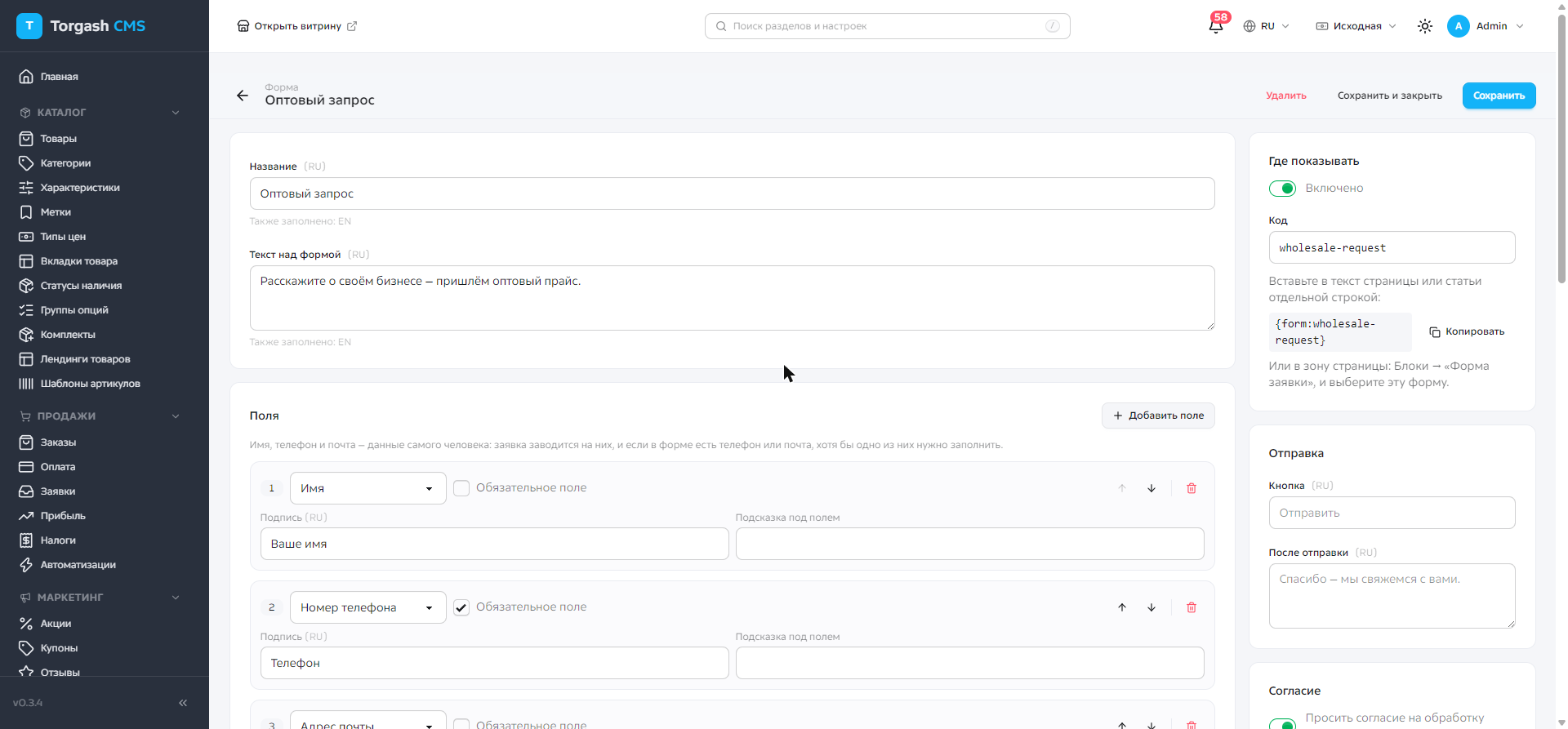
- Name — the heading over the form and the enquiry’s kind in the inbox.
- Text above the form — a line or two of what it is for.
- Fields — in the order they are asked; the arrows reorder, the bin removes.
- Button and After sending — what the button says and the thank-you that replaces the form.
Fields
Name, Phone number and Email address are the person’s own details: the enquiry is filed under them. If a form has a phone or an email, at least one of them must be filled in.
The rest are answers: a line, several lines, a number, a date, a drop-down list, one of several, several of several, a tick box, photos. Each field has a label, a hint under the field and Required field. A list’s answers are written one per line.
The Photos field takes pictures only, kept privately with the enquiry. How many is an Enquiries setting, how large is the Media module’s. Documents, PDF and the like, are not accepted.
Consent
Ask to agree to the processing of personal data adds a box that must be ticked to send. The words beside it and the link to the policy are yours. The words are kept with every enquiry as they read when it was sent.
Where the enquiries go
An address of its own for the letters about this form’s enquiries, instead of the shop’s usual one, and a manager every enquiry from it is given to.
Languages
Like every text in the admin, a form is written in the content language chosen at the top. Switch the language and type the same labels and answers in it. A list’s answers are matched line by line, so keep their order the same in every language.
Putting the form on a page
On the right, Where it is shown holds the switch and the form’s code.
- In the text of a page, a blog article or an HTML block, write
{form:wholesale-request}on a line of its own. The Copy button beside the code puts that line on the clipboard. - In a zone of a page: Blocks → “Enquiry form”, and choose the form in the list.
What’s next
- Enquiries — where what the form brings lands.
- Personal data — customers’ consents and requests.