Three things, three tabs in Appearance → Banners:
- A template says how a banner looks: HTML with
{tokens}and its CSS. A banner template draws one banner, a frame draws a slider around the slides. - A banner is what you type into the template’s fields: words, a picture, a link, a colour. The HTML is never seen.
- A slider is a frame with banners inside. The Banners block puts it on the page, in a zone.
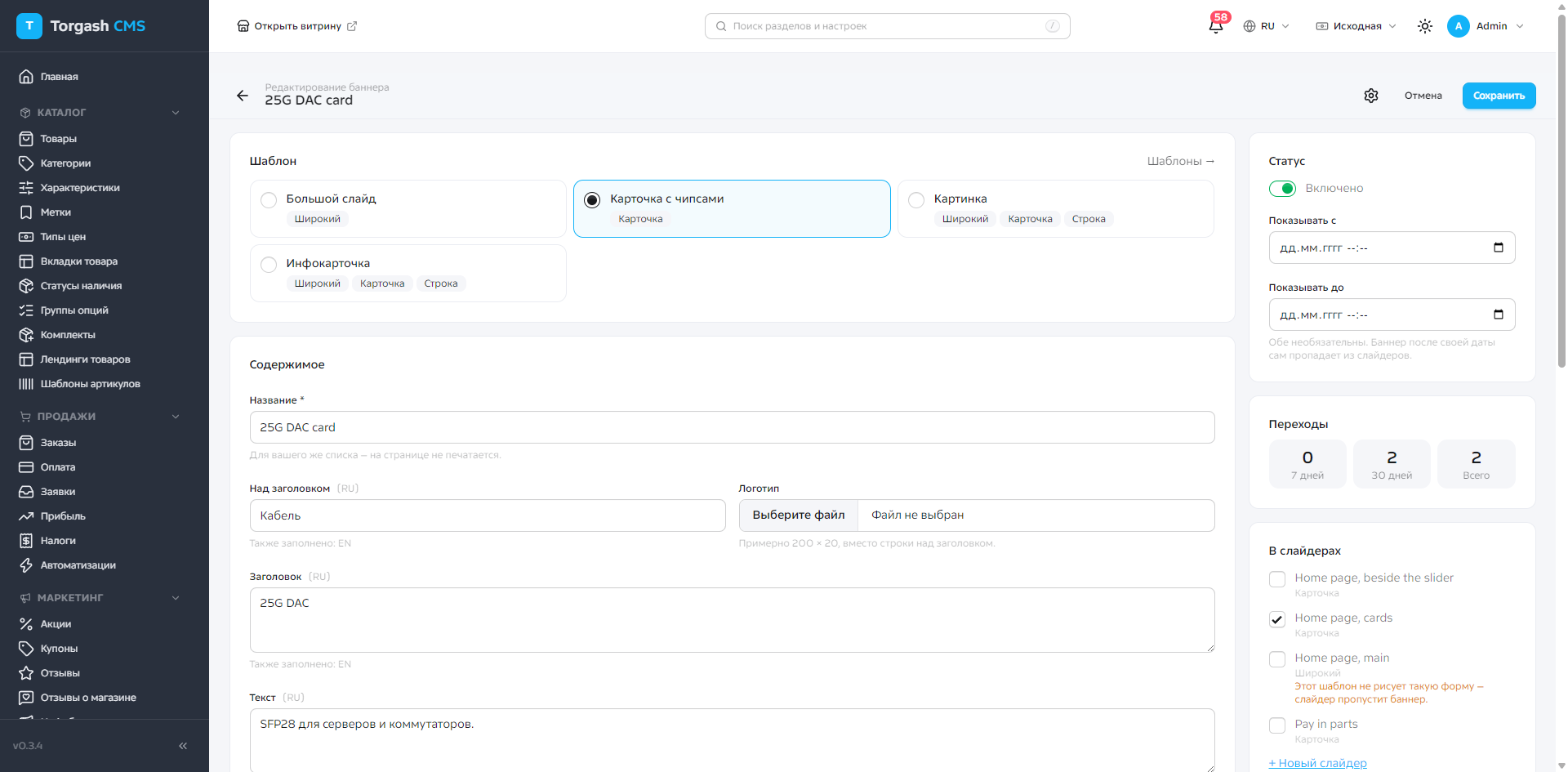
A banner
Choose a template and the form asks for its fields the way the template described them: a line, text, a picture, a link, a colour, a choice, a switch, an icon, a list of links. The preview is drawn as you type. Then which sliders it stands in, Show from / until and the conditions.
A banner is shown when it is on, within its dates and passes its conditions, the same ones blocks have: the storefront, the language, the customer group, the page; a calendar for what repeats every year (holidays 25.12–08.01; a holiday with a moving date, with the year), the day of the week, the time of day by the shop’s clock; the visitor’s town, region or country: the town they chose in the header.
Duplicate makes the next banner from this one; the copy is off and in no slider until you put it there.
Shapes
A banner is drawn in one of three shapes, and the template writes HTML for those it can: wide, across the column, the main slide; card, vertical, for a carousel and a grid cell; row, low, for the catalogue as a list. The frame says which shape its slots are; a banner whose template does not draw that shape is skipped by the slider, which says so beside it.
Video and clicks
A field of the type “Video (file)” takes an mp4 or webm up to 10 MB: a looped silent clip behind the slide; the “Big slide” has “Video behind the slide” and “Darken the video” so white text stays readable. The video plays only for the slide on screen and never for a visitor who asked their system for less motion.
Clicks on a link inside a banner are counted by day and shown in the list (30 days) and on the form (7 days, 30, all time). Views are not counted; the site’s statistics do that. The link stays an ordinary link.
A slider
The frame, the banners in it and how it moves: “In a row” can be fractional, 4.3 is four cards and the edge of a fifth, showing there is more; a swipe turns one slide, glides and snaps, or glides freely; an arrow turns one slide or all visible; the speed; in a loop: without it the arrow at the edge hides. A slider moves only while the pointer is not over it and never in a hidden tab.
A slider with nothing to show prints nothing, and the block disappears.
“Also between the products of the catalogue”: after which product, repeat every how many, in which lists. Its banners take the places in turn: as a card in the grid, as a row in the list. A banner is an extra cell, so the page still shows all of its products.
Templates
The module has its own: Big slide, Info card, Picture, Card with chips; the frames Slider, Card carousel, Column, Slider with a column. A theme may add its own. At installation they are copied into the database and are yours from then on: Restore from the preset returns a template to its file, the banners keep what was typed; Export / import carries a template between shops as one file.
How a template is written:
<div class="promo" style="background: {background}">
    [<div class="promo-title">{title}</div>]
    [<img class="promo-cover" src="{cover}" alt="{alt|optional}" {loading}>]
    [<a class="promo-button" href="{link}">{button}</a>]
</div>
{title}is a field: write it in the HTML and it appears on the right, where you say what type it is.[ … ]disappears whole when the field inside is empty: no empty heading, no button without a link.{alt|optional}may be empty and does not remove its brackets.{cover|width},{cover|height},{cover|small}: the picture’s size and thumbnail;{loading}: the first slide loads at once, the rest as they come near.- Every banner is wrapped in
<div data-template="key" data-shape="…">: start the CSS with[data-template=key]to touch nothing else. A<style>in the HTML moves into the CSS on save; a<script>is removed, scripts belong in Code snippets. - A frame has
{slides},{items},{dots},{prev},{next},{counter},{progress}and{aside}, the slider from the “Beside” setting.
Exchange
Banner is an entity of import and export: a row per banner with its template, name, dates, sliders and conditions, and a column per field of the shop’s banner templates: words per language, a picture by its address, a list of links as one JSON cell. Rows are matched by ID: your own shop’s file updates its banners, in another shop they become new.
What next
- Blocks and zones: where the Banners block is placed.
- Promotions: a sale has its own page for a banner to lead to.