Appearance → Blog holds the articles, Blog rubrics the rubrics. The feed lives at /blog; the rubrics are a column to the left of the feed with the number of articles in each (a strip above the articles on a phone). There are no tags and no monthly archive: nobody looks for an article that way.
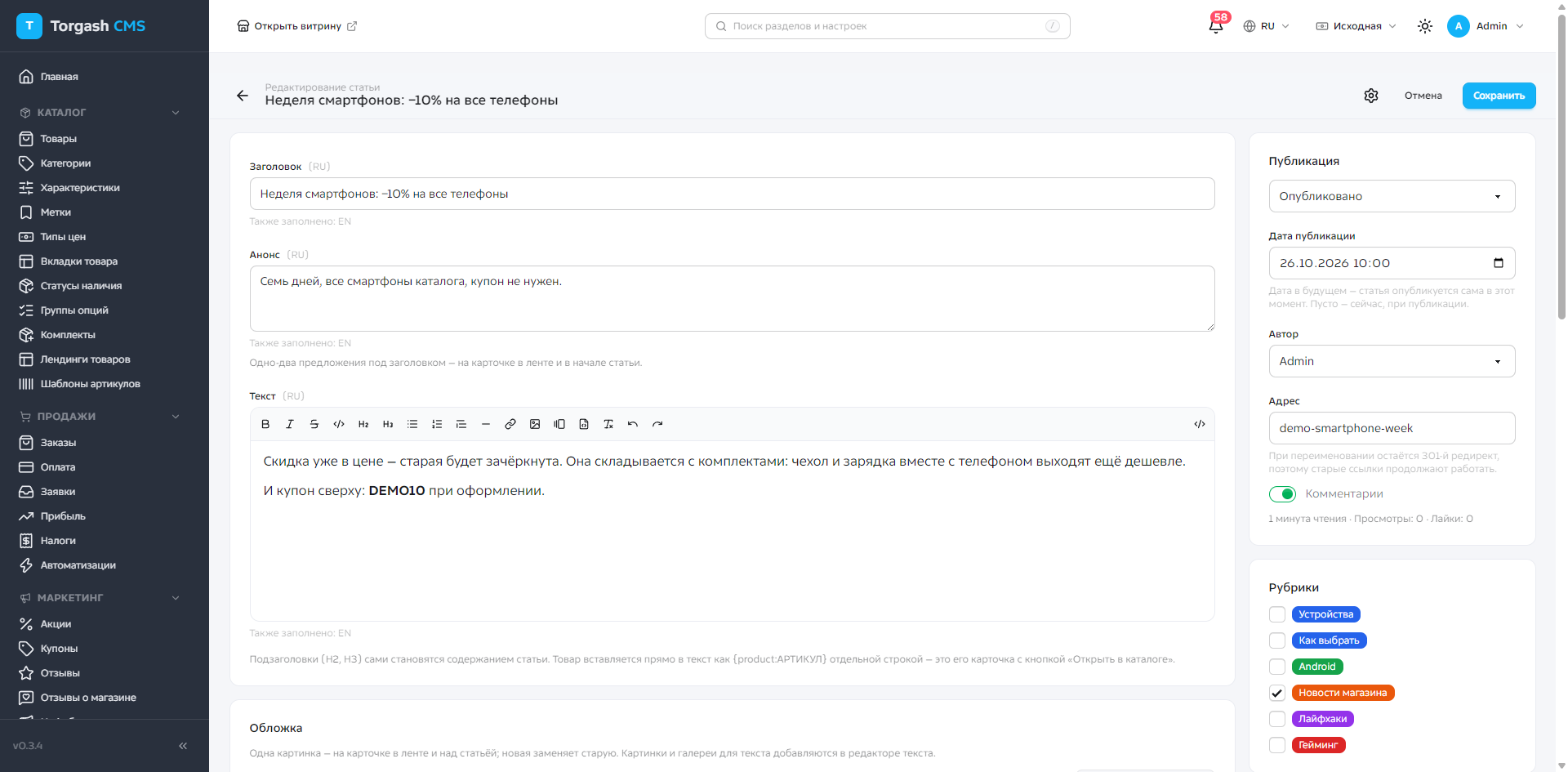
An article
- Title and Address: the address is made from the title; the article lives at
/blog/addressand never depends on a rubric, so moving it between rubrics breaks no link. A rename leaves a 301. - Lead: a sentence or two under the title, on the card in the feed and at the top of the article.
- Text: the same editor products use; pictures and galleries are inserted in it. Every second- and third-level heading goes into the contents beside the article, lit as the reader scrolls.
- Cover: one picture, on the card in the feed and over the article; a new one replaces it. An article with no cover takes the colour and icon of its first rubric.
- Rubrics: an article can be in several.
- Products in the article: SKUs, one per line: a strip of their cards under the article in this order.
- Author, comments: on or off for this article.
Publishing
Status: draft, published, hidden (reachable by its link, in no feed). A publication date still ahead publishes the article then on its own, nothing has to run; empty means now. The reading time is worked out on save.
Rubrics
A rubric is a coloured plate: name, address (/blog/rubric/address), description, icon and colour, sort order, shown or not. Deleting a rubric does not touch its articles; they simply leave it.
On the storefront
The feed is ordinary pages; “Show more” brings the next one. The newest article of the first page is drawn wide. Under an article: “Read also” from the same rubrics (how many is a module setting), the article’s products, a like (one per browser, works without a script), share (Telegram, Viber, WhatsApp, Facebook, X, copy the link; the system’s own sheet on a touch screen), views (once per session, crawlers not counted).
The blog’s zones, beside the feed (a column under the rubrics) and under an article, are ordinary block zones. The Blog posts block puts the latest articles on the home page: one large beside a few small, or a row of cards.
Comments
The Comments module gives a Comments block: put it in the “under an article” zone. Its settings: check comments before publishing (on by default), only signed-in customers may comment, an address to tell about new ones. The form is guarded the same way enquiry forms are.