A menu is data: a named list of items. Where it stands is decided by the Menu block in a zone; how it looks is that block’s setting: a line, a list, columns or a drawer. One menu can stand in the header as a line and in the footer as a list. Appearance → Menus lists the menus; each has a code the theme finds it by: the “Catalogue” button in the header and the phone’s bottom bar take the menus chosen in the theme settings.
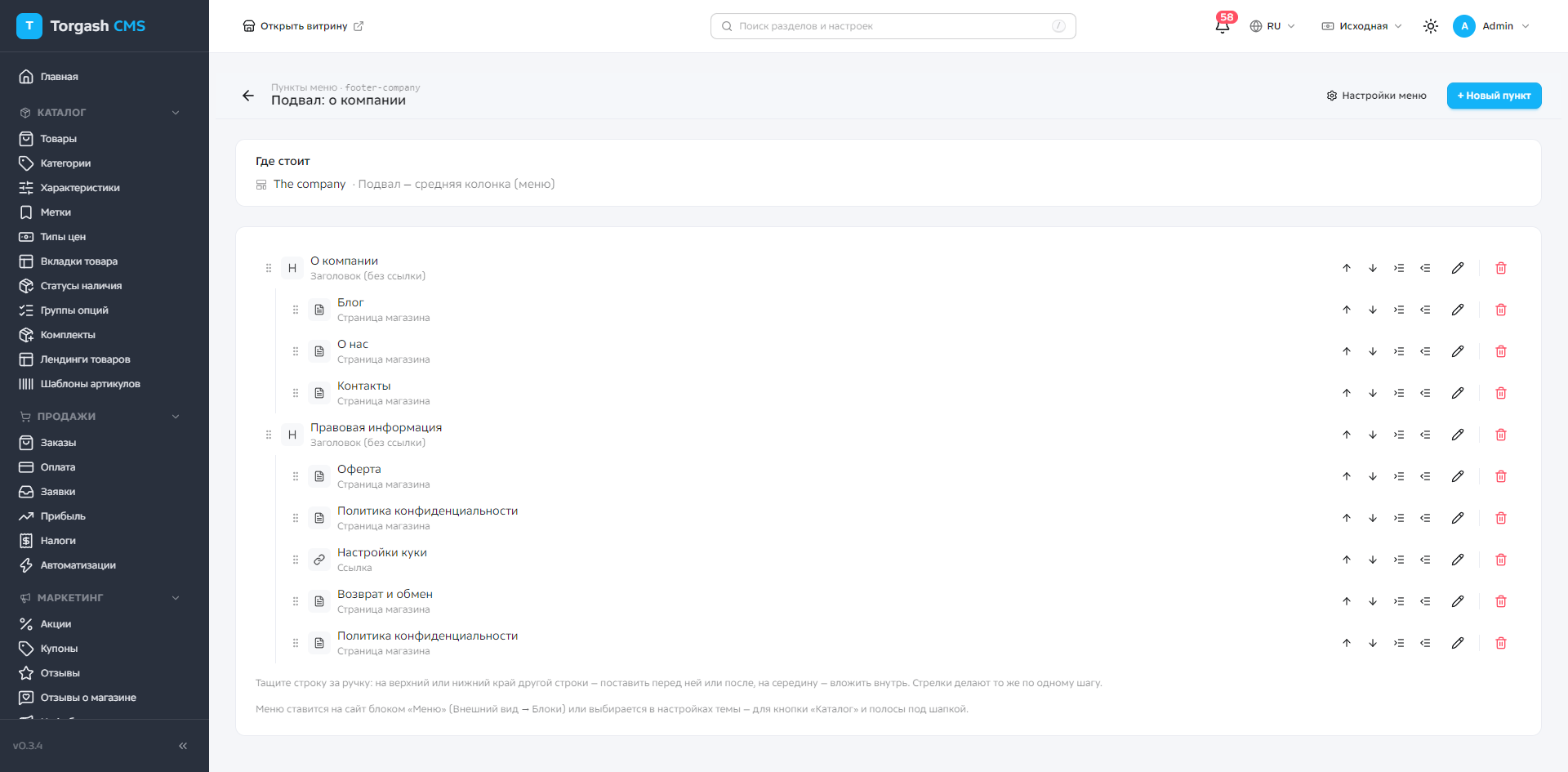
Items
An item is dragged by its handle: onto the upper or lower edge of another to go before or after it, onto its middle to go inside. The arrows do the same one step at a time. An item’s kind:
- Link: any address; Open in a new tab if needed.
- Page: a page of the shop by name, not by address: your own page, the blog, the wishlist, the comparison, whatever modules registered. The address is built for the reader’s language, and the item disappears by itself if the page does.
- Category: a catalogue category that can open into its subcategories.
- Heading: a word without a link over a group of items; Divider.
- Shortcut: a storefront action: the basket with its count, “open the catalogue”, for the phone’s bottom bar.
The name can be left empty: the item takes the name of the page or category and follows a rename. An item also has a small line under the name, an icon, a badge with its own colour (“new”, “−30%”), screens (everywhere, only on a computer, only on a phone) and Show this item only when…: the same conditions as blocks have: the storefront, the language, the group, whether the visitor is signed in.
A category that opens
A category item has Subcategories: how many levels down, at most how many per level (past it, an “N more” link leads to the category), the order (as in the catalogue, by name, most products first), “Everything in …” as the first entry of the submenu, show the number of products, excluded subcategories.
Show a subcategory: always; when it has products at all; when something in it can be bought (a preorder counts); when something in it is on the shelf. Hide the item itself when its category is empty by the same rule, so a seasonal department leaves the menu on its own.
Put the subcategories in place of the item: the item is not drawn, its children are. That is how a “The whole catalogue” item (no category chosen means the top categories) becomes the list of departments and stays up to date by itself.
Where a menu stands
- The Menu block in any zone: the header, the footer’s middle column, the phone menu. The look is the block’s setting.
- The “Catalogue” button in the header and the category strip under it: menus chosen in the theme settings (the “Header” section); none chosen means the category tree in the same shape.
- The phone’s bottom bar: a menu from the “Phone” section of the theme settings.
A disabled menu draws nothing wherever it stands. Deleting a menu leaves its places empty.
What next
- Blocks and zones: where the Menu block is placed.
- Pages: the pages a Page item points at.