A counter, a pixel, a chat widget, a verification code from a search engine: a piece of code somebody gave you, a place on the page and the rules for when it is there. Appearance → Code snippets.
The code is printed exactly as written, script tags included: nothing tidies it and nothing is cut out. It never reaches the admin panel.
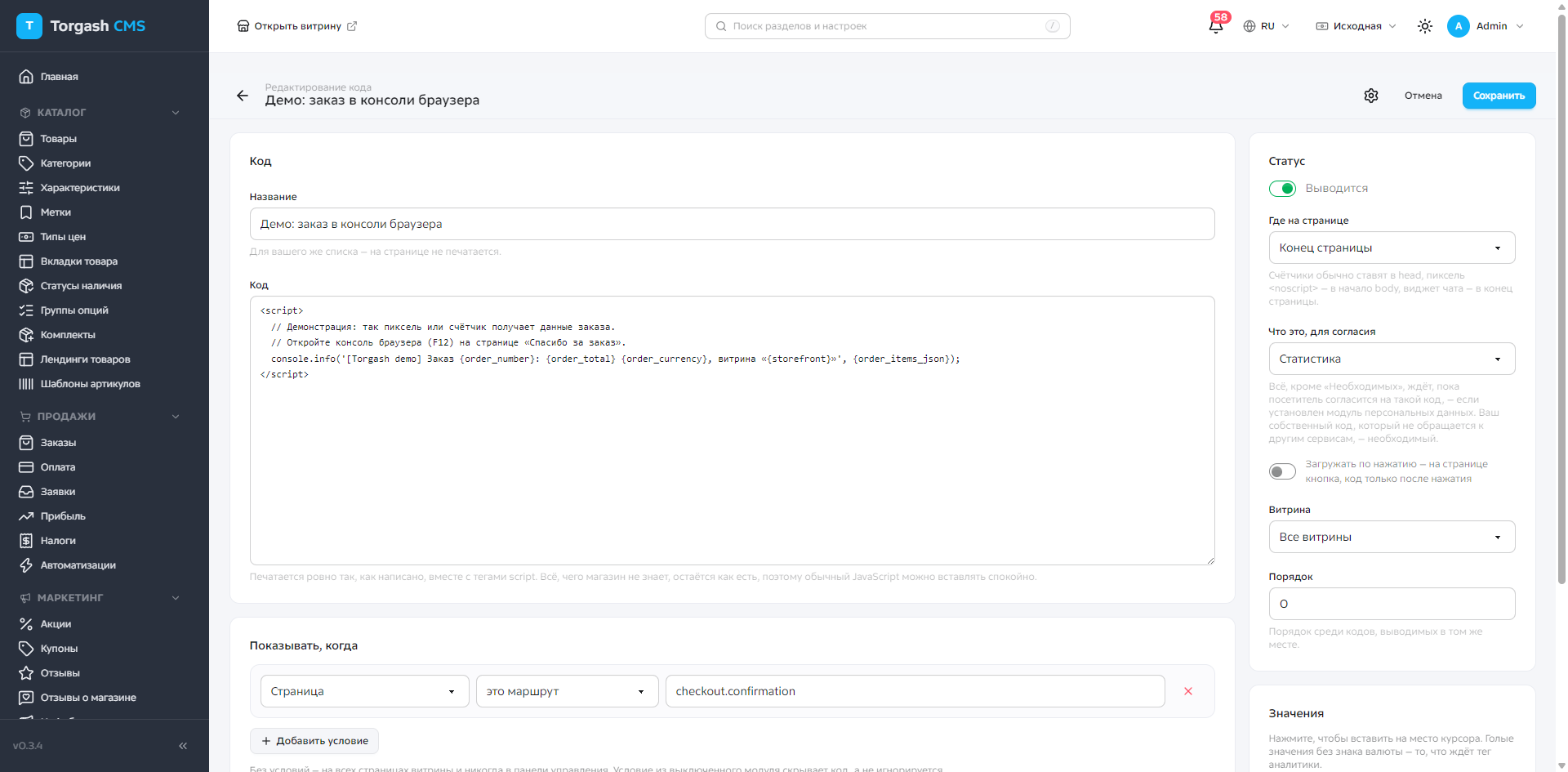
Where on the page
Three places, the ones providers’ instructions name: Page head for almost any counter; Start of the page body for the <noscript> pixel that comes with a counter; End of the page for chats and whatever must not delay drawing. Sort order is among the snippets of one place.
Load on click: a button on the page, the code only after it is pressed. For a chat: the page stays light, and pressing is the visitor asking for it.
When it is shown
With no conditions the code is on every storefront page. The conditions are the ones blocks have: Page is a route name (checkout.confirmation is “thank you for the order”, catalog.product any product page; “route starts with” catches a page in every language at once), Language, Storefront, Visitor (signed in or not), Customer group.
“The conversion pixel on the thank-you page only” is one condition; “the counter everywhere but the admin” needs none. A condition from a module that was switched off hides the code: for a tracking tag that is the safe side.
Order data
On the order confirmation page the code may ask about that order. The Values buttons insert a token at the cursor:
<script>
  gtag('event', 'purchase', {
    transaction_id: '{order_number}',
    value: {order_total},
    currency: '{order_currency}',
    items: {order_items_json}
  });
</script>
{order_number} as the customer sees it; {order_total} a bare number with no currency sign, in the currency the customer was actually charged in; {order_currency} its code; {order_items_json} the lines as an array of {sku, name, price, quantity}. {storefront} and {currency} work on any page. Off the confirmation page the order tokens are empty, so such code left everywhere breaks nothing.
Anything in braces the shop does not know stays as written: ordinary JavaScript (${total}, function () { … }) can be pasted safely.
Cookie consent
What it is, for consent: necessary, statistics, marketing and so on. Anything but “necessary” waits until the visitor agrees to that kind of code, when the personal data module asks them. Your own code that talks to no other service is necessary.
Who may edit
Editing needs a separate permission, “Manage code snippets”, deliberately not part of managing content: this is the one screen where what you write runs in every visitor’s browser. Every change goes into the audit log together with what the code was before.
What next
- Personal data: the consent banner the counters wait for.
- Blocks and zones: the HTML block for markup that is not a script.