Backups live under System → System, the tabs Backups, Backup plans and Backup storages. Backups are made by plans: each says what goes in, when to make one and which storages keep it. A storage is a place: a folder on the server, a bucket, another server, Google Drive.
The list of backups
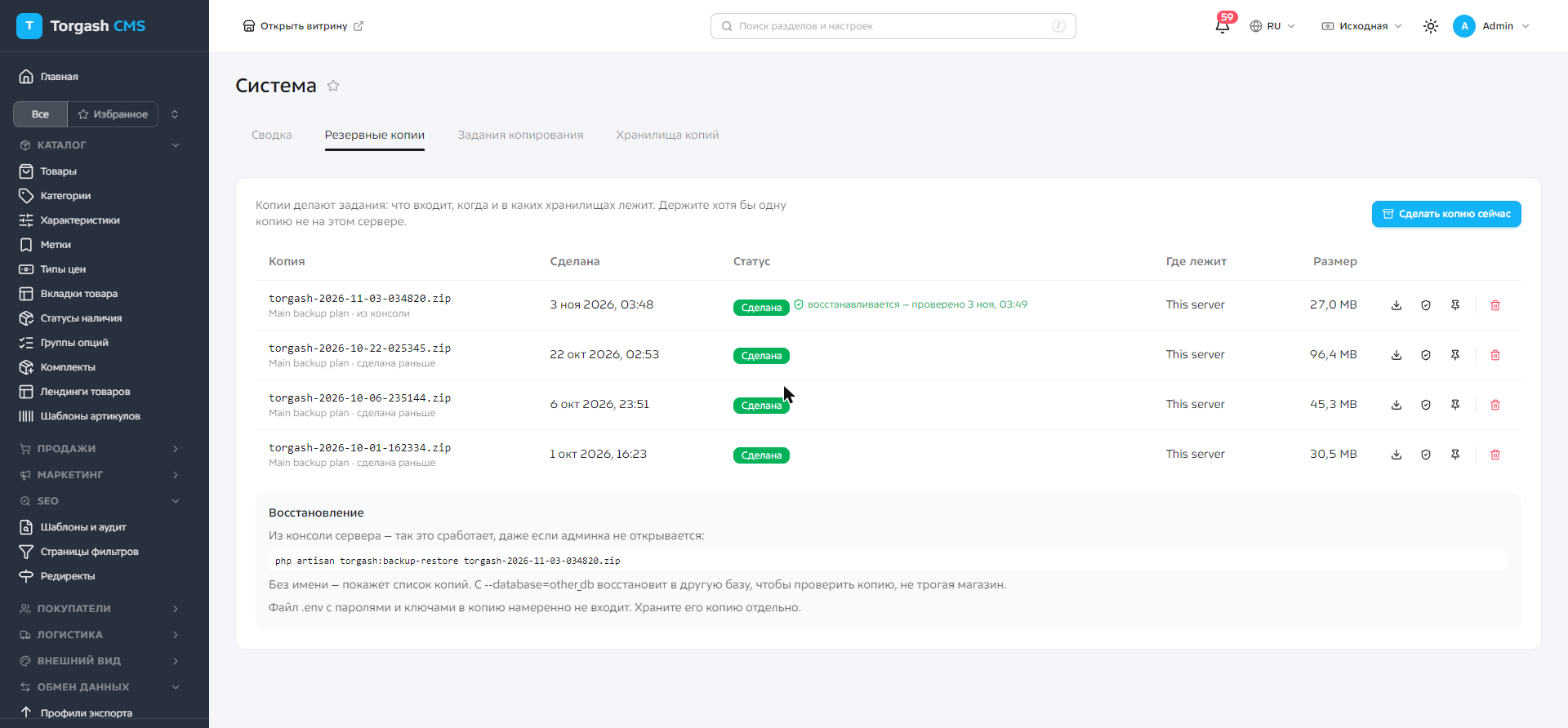
Each row is one backup: the file’s name, the plan and the occasion (by the schedule, by the button, from the console, before an update), the date, the status, where it is kept and the size. The green restores — checked mark means the backup was already unpacked into a separate database and everything matched. On the right: download, check by restoring, pin (a pinned backup is deleted by no retention rule), delete.
Make a backup now runs the plan outside its schedule; the backup is made in the background and the row says “Being made”.
Under the list, how to restore. Restoring is from the server’s console only, on purpose: an update that broke the admin would have shut the door a button would be behind.
php artisan torgash:backup-restore torgash-2026-11-03-034820.zip
Without a name the command lists the backups. With --database=other_db it restores into another database, to check a backup without touching the shop. The .env file with the passwords and keys is left out of a backup on purpose; keep a copy of it apart. An encrypted plan may put it inside.
A backup plan
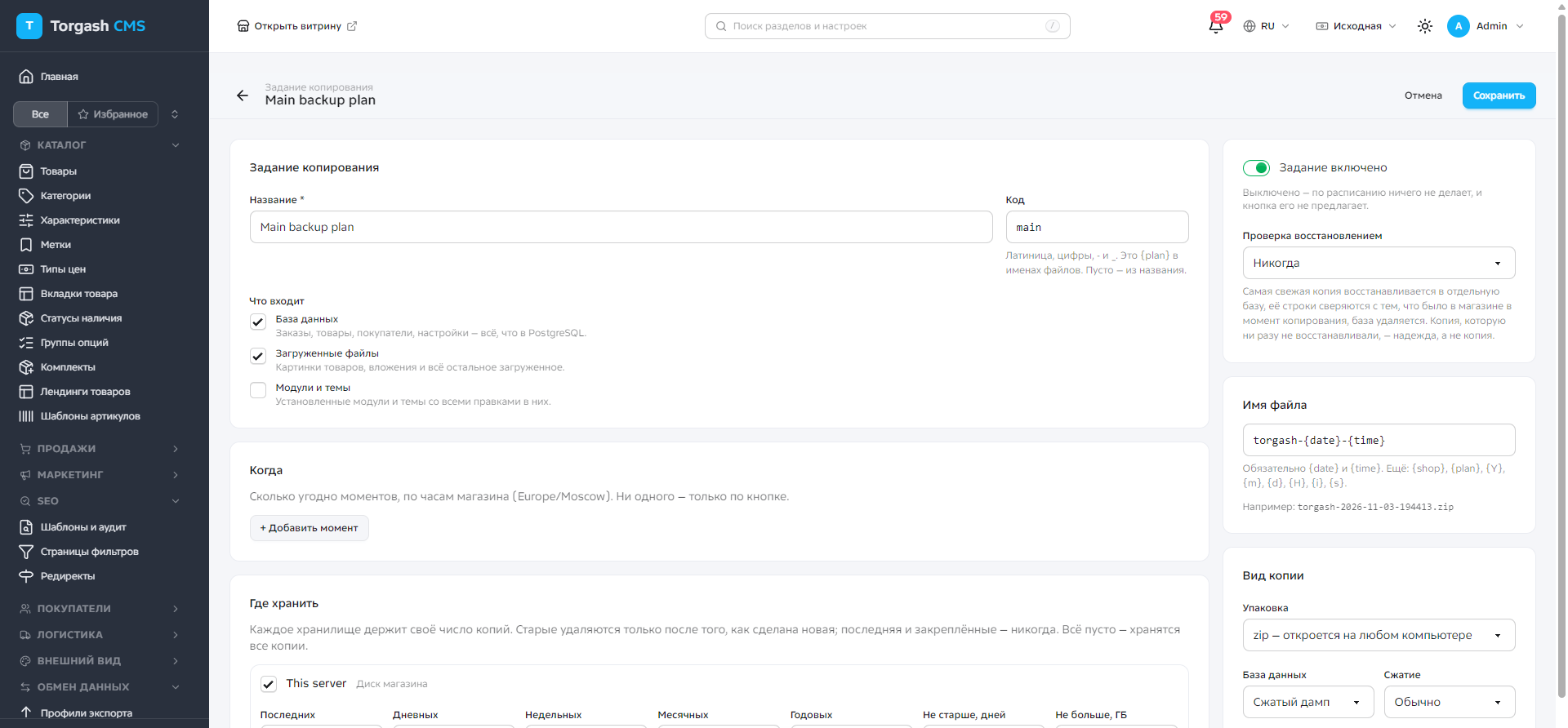
- What goes in — the database (orders, products, customers, settings: everything in PostgreSQL), uploaded files (pictures, attachments), modules and themes (with every change made to them). Files in a bucket are not copied: the bucket keeps them.
- When — any number of moments by the shop’s clock: every day at a time, every few hours, on days of the week, monthly, or a cron expression. No moments: the plan runs only by the button. The schedule needs the scheduler and a queue worker.
- Where it is kept — tick the storages, each with its own retention: the last N, daily, weekly, monthly, yearly, not older than N days, at most N GB. Older backups are deleted only after a new one is made; the newest and the pinned ones never. All empty: every backup is kept. 7 daily + 4 weekly + 12 monthly keep a year in about two dozen files.
- Name of the file — a template that must hold
{date}and{time}; also{shop},{plan}, the year, month and day. - Form of the backup — the container: zip (opens on any computer), tar.gz (smaller, the Linux way), tar (not compressed, quicker) or no archive, a folder of files: every file is put in the storage as it is, and any one can be taken without unpacking. The database as a compressed dump (smaller and quicker to restore) or plain SQL (read by eye, moves to another PostgreSQL version more easily).
- Encrypt with a password — AES-256; opens in 7-Zip, WinRAR, The Unarchiver, not in the zip Windows has built in. File names inside a zip are not encrypted, tar.gz hides everything. Only an encrypted backup may carry
.envtoo. - Check by restoring — never, daily, weekly: the newest backup is unpacked into a separate database, the rows of every table are compared with the counts taken when the backup was made, the database is deleted. A backup nobody has ever restored is a hope, not a backup.
Backup storages
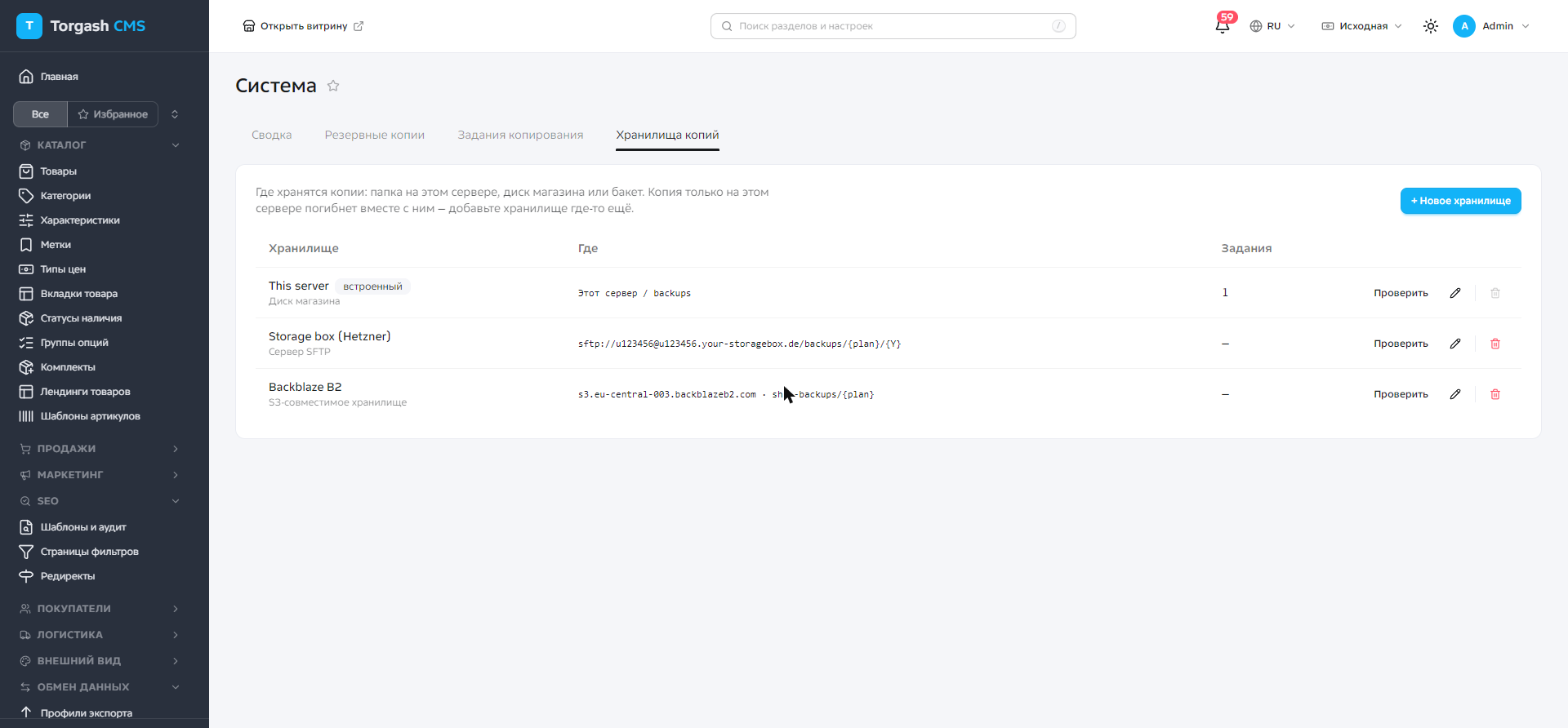
The kinds: a disk of the shop, a folder on this server (never inside the site’s folder), S3-compatible (Amazon S3, Backblaze B2, Cloudflare R2, MinIO, RustFS, Yandex Object Storage, Selectel), SFTP, FTP/FTPS, WebDAV (Nextcloud, ownCloud, Yandex Disk, a NAS) and, with its module, Google Drive. S3, SFTP and WebDAV can go through an HTTP or SOCKS5 proxy.
Save and check writes a small file into the storage, reads it back and deletes it. An SFTP server’s key is shown to you on first acquaintance to confirm, never trusted silently; any other key afterwards is refused. Passwords and keys are kept encrypted with the shop’s key; on another server they are typed again.
The This server storage is built in: updates keep their backup there, and it cannot be deleted.
When a backup goes wrong
The shop says so itself: the bell in the admin, a letter to the owner and a warning on the summary when a backup failed, did not reach every storage, did not pass the check by restoring, or a scheduled plan has not made a good backup for a long time. Silence counts as a failure too: when the queue worker is not running the plan simply never runs, and that is said.