The Security section is the Guard module (torgash.guard): the one place the shop hears about what it would otherwise never hear of. Each part is switched on separately under Settings → Guard.
Errors
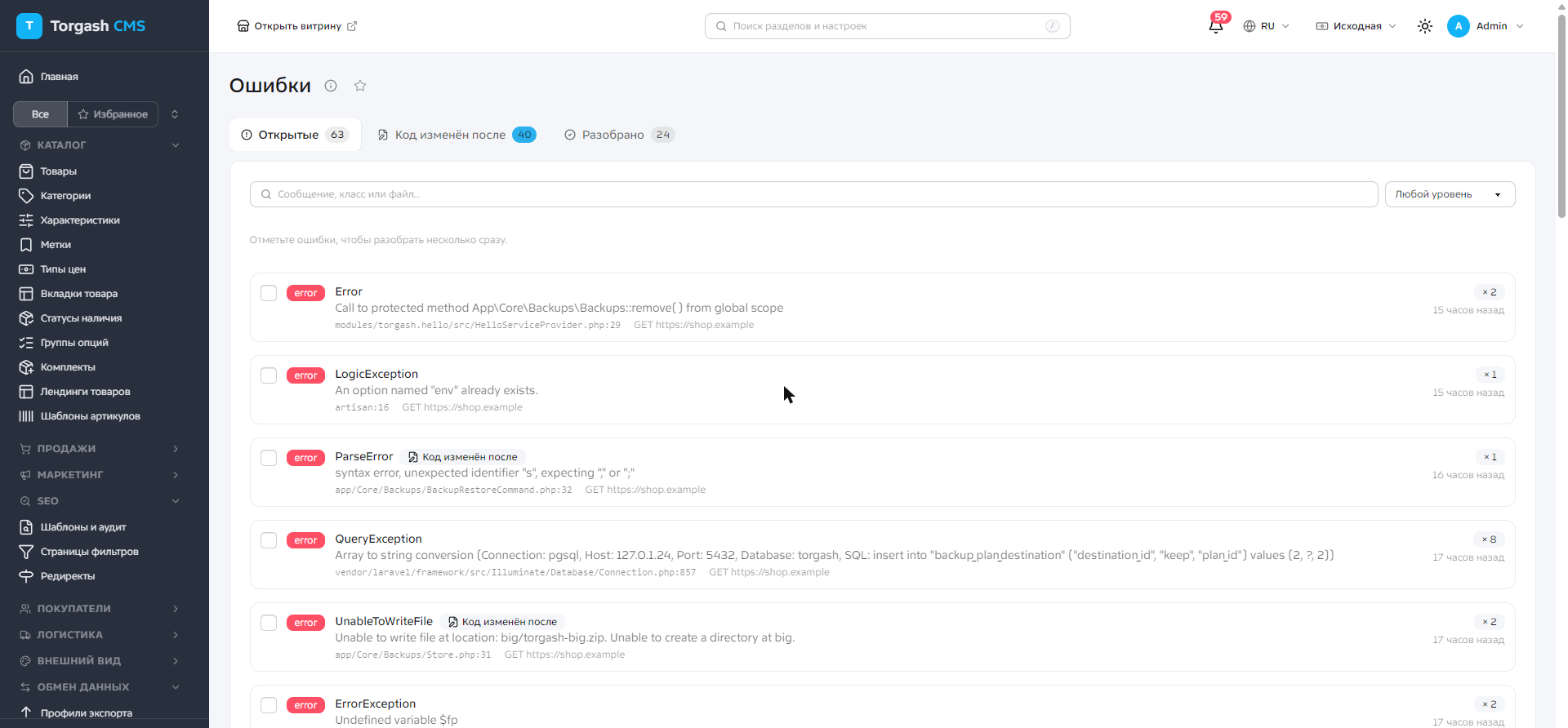
A 500 on the storefront usually goes into a log on the server the owner never opens. Here it lands in a list: class, message, file and line, address, how many times and when last.
- One row per kind, not per occurrence. A thousand identical failures are one row “× 1000, last three minutes ago”. Two failures are the same when it is the same exception in the same place; numbers in the message do not count, so “Order 512 not found” and “Order 4096 not found” are one problem.
- Code changed since — the file the error happened in was saved later than the error last happened. Most likely fixed: open it, check and mark it dealt with.
- Dealt with — “I have dealt with this” hides the row without deleting it: the same thing happens again and the row comes back with its count. A problem that returns must return.
Settings: whether to collect errors, from which level, what to ignore (one substring per line) and how many days to keep them, counted from the last occurrence.
Audit
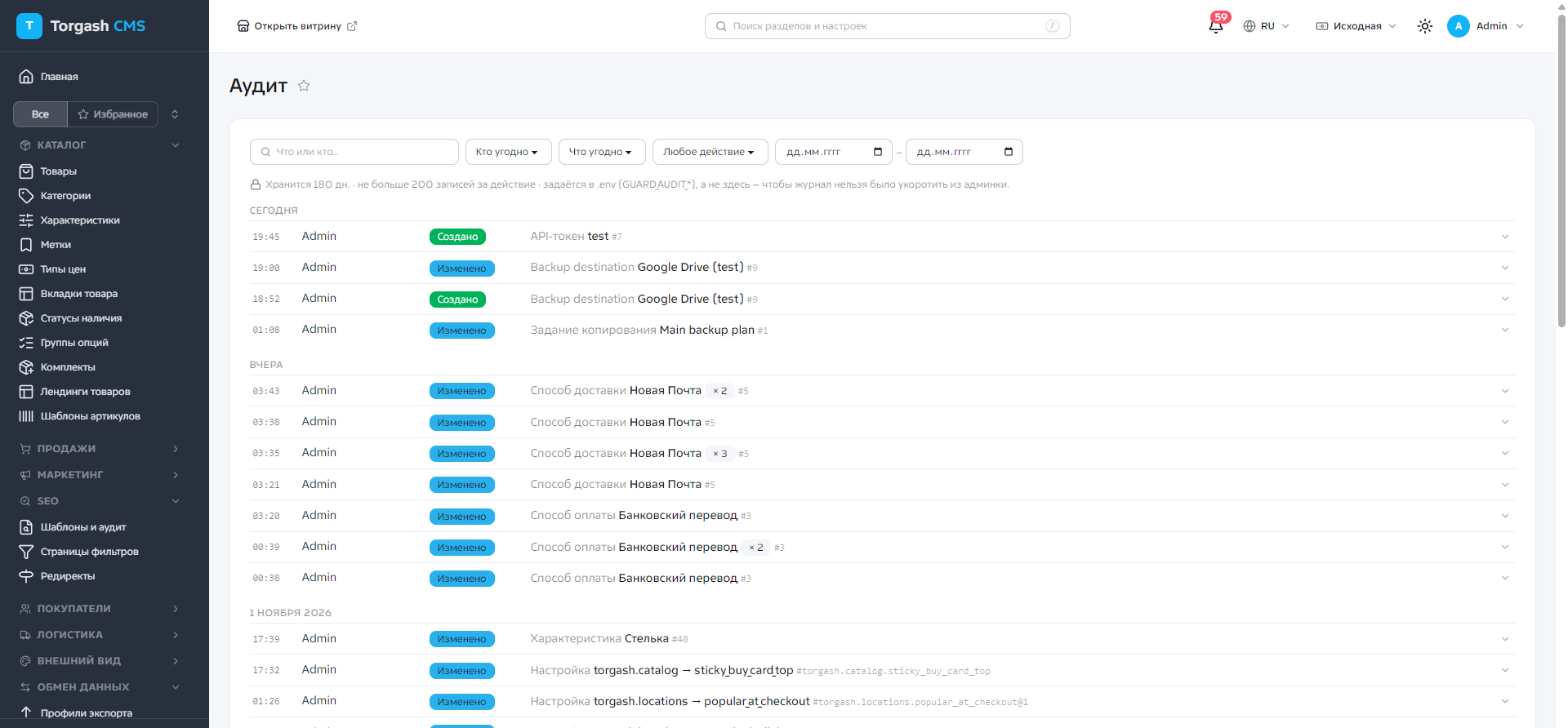
Who changed what, and what it was before. Each record is a person, a time, a record, a field, the old value and the new one. Everything changed through the admin or through /api/v2/admin/* is written (the journal names the token’s owner), plus two things beyond table rows: a setting that changed and a module installed, removed, switched on or off. The storefront, the queue and the console are not recorded: nobody clicked.
- A deletion keeps a copy of the row, often the only one left.
- Passwords, tokens and keys are never recorded with a value, only as “changed”.
- Put back as it was — on a change or a deletion: the fields return to their former values, and a deleted row is restored. Fields somebody changed since are left alone; what could not be put back is listed in the result. A background task (an import) has “Put back everything this task did”.
- There is no delete button. A journal an admin can tidy from the admin is not a journal. Records leave by the retention period, 180 days by default.
Switching it on, the retention period and the limit of records per request are set in .env (GUARD_AUDIT, GUARD_AUDIT_RETENTION_DAYS, GUARD_AUDIT_MAX_PER_REQUEST), not on the settings page: an admin whose actions the journal records must not be able to blind it from the very screen it watches.
Invariants
What must be true of the shop is checked every night and by the Check now button. Each statement is a sentence: “no order has a negative total”, “a product kept in warehouses has the sum of their stock”, “a delivery method is offered in at least one zone”, “an automation rule waits for an event somebody announces”. A broken one comes with a second sentence on what to do and a link to what is wrong.
Statements are grouped by the module that made them; the true ones are listed too, with the date of the last check, so “all is well” differs from “nobody has checked”. A fixed one disappears by itself on the next run; This one is fine hides one row that is allowed to be odd.
The panel at the top of the screen is about uploads: the self-test writes a harmless script where uploads go, asks the web server for it and sees whether it comes back as text; if it runs, the setting to add is shown for Caddy, nginx and Apache. The scan lists what is executable in the public folders and deletes nothing.
Blocking
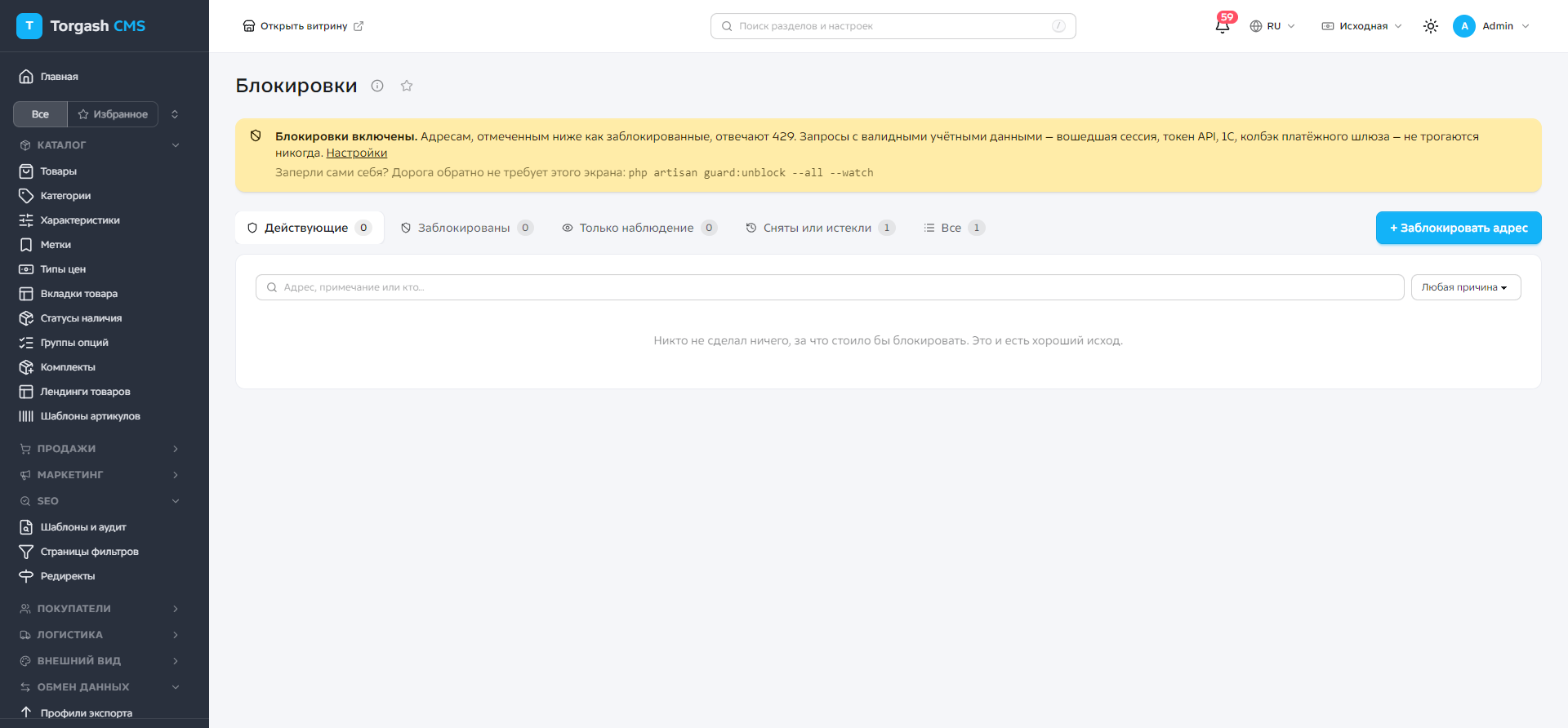
An address is blocked when it collects too many refusals: wrong passwords, refused forms, unknown API tokens. A block runs out by itself; an address that comes back is blocked longer each time. A request presenting valid credentials (a staff session, an API token, 1C, a payment callback) is never blocked.
It starts with watching, deliberately: in Only watched mode the screen shows who would have been refused, and nobody is. Read the list, then switch on Block for real in the module’s settings. An address can also be blocked by hand, and let back in. An IPv6 address is blocked with its whole /64 network.
CAPTCHA and the second factor
CAPTCHA goes on the one form that is actually spammed, not on the whole shop: the list of forms is collected from the modules. The checkout counts on its own: one check per order. A second factor (a code from an app) can be required of admins at sign-in; guard:two-factor in the console lifts the requirement when somebody lost their phone.