System → System, the Summary tab, collects in one place what is usually hunted for across the server: versions, PHP limits, the database’s size, free space and whether the background moves. Warnings come first, as sentences, with a hint of what to do.
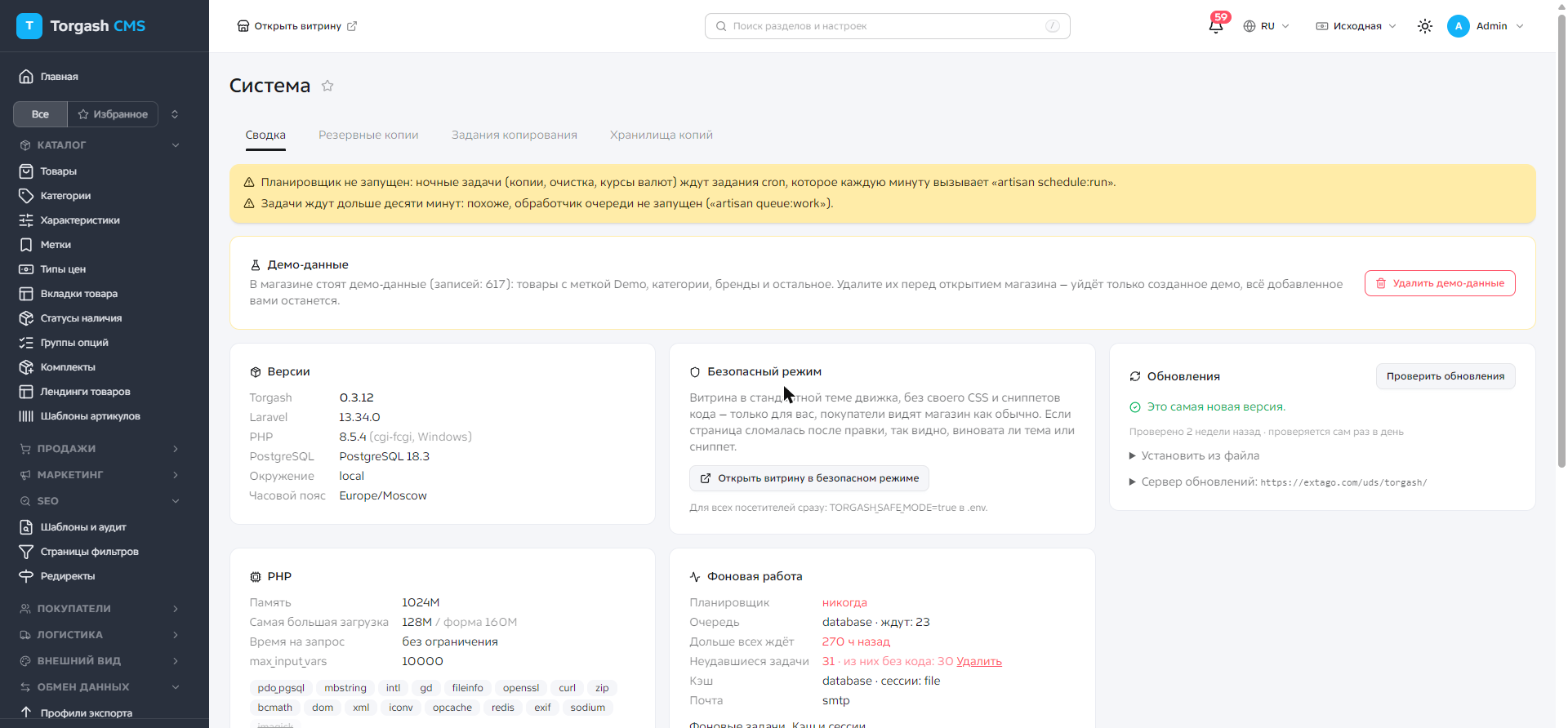
Warnings
The yellow strip at the top appears when something needs attention:
- The scheduler is not running — the nightly tasks (backups, clean-up, exchange rates) wait for the cron job that runs
artisan schedule:runevery minute. The shop writes a pulse every minute, and its absence shows cron is not set up. - Tasks have waited over ten minutes — the queue worker (
artisan queue:work) is not running: letters, imports and backups pile up in the queue. - Cyrillic is not folded — the database was created with the C locale and Russian search half-works. How to fix it is in the installation guide.
When all is well there is no strip: “Nothing needs attention”.
The cards
- Demo data — while the demonstration products, categories and brands are in the shop, the card offers to remove them with one button. Only what the demo made goes; everything you added stays.
- Versions — Torgash, Laravel, PHP (and how it runs), PostgreSQL, the environment, the shop’s time zone.
- Safe mode — the storefront in the engine’s stock theme, without its own CSS and snippets, for you alone: customers see the shop as usual. When a page broke after an edit, this shows whether the theme or a snippet is to blame. More under safe mode.
- Updates — the last check, the “Check for updates” button, install from a file and the update server’s address. More under updates.
- PHP — memory, the largest upload (PHP’s limit and the form’s), time per request,
max_input_varsand the list of extensions. These are the web server’s limits; the console may have others. - Background work — the scheduler (when its last pulse was), the queue and how much waits in it, the longest-waiting task, failed jobs (and how many belong to code since removed, with a button to clear them), cache and sessions, mail. The links lead to background tasks and the cache.
- Database — size, the largest tables and the locale, with the check “Cyrillic search works”.
- Disk — free space, and whether photos and uploads are on this disk or in a bucket.
- Libraries — a check of the libraries the engine is built on against the public advisories database. Started by the button, runs in the background.
- Stylesheet — built from the templates of the engine, the themes and the modules; rebuilt by itself when a module or a theme changes, the Rebuild button is for a template edited by hand on the server.