System → Background tasks shows everything the shop does in the background: imports and exports, backups, thumbnails, exchange rates, video preparation, carriers’ directories. A task that hangs is cancelled here.
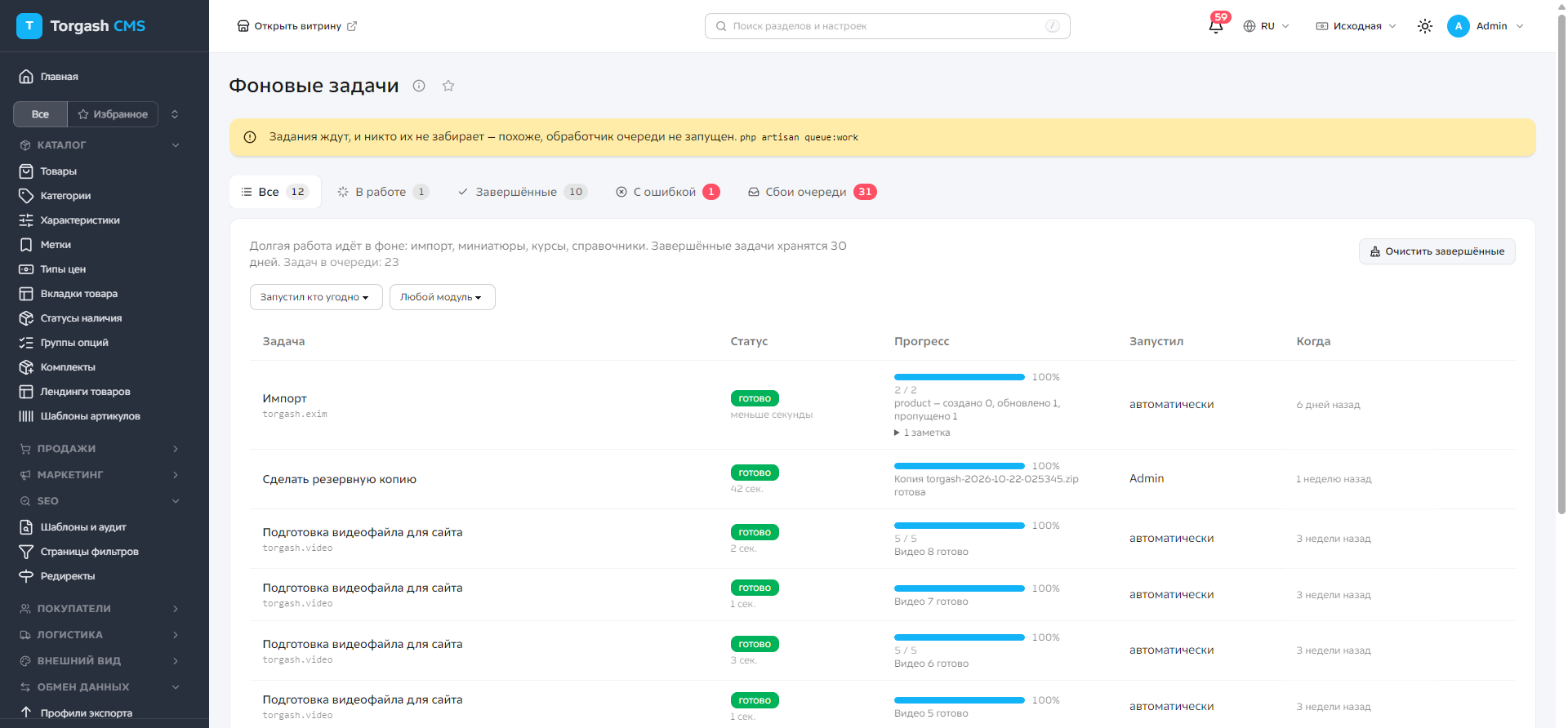
The tabs: All, In progress, Finished, With an error, Failed queue jobs. The filters above the table: who started it (anyone, automatically, a particular person) and which module.
In a row:
- Task — what is being done and whose module it is.
- Status — queued, in progress, done, failed, cancelled; under it, how long it ran.
- Progress — a bar and the task’s own words: “2 / 2, product — created 0, updated 1, skipped 1”, the name of a finished backup. An import unfolds notes under its progress about the rows it did not like.
- Started by — a person, or “automatically” (the scheduler, a rule, a change of data).
- When — how long ago.
A task in progress can be stopped: it stops at its next step and what it has done stays done. Finished tasks are kept for 30 days; Clear finished removes them sooner.
Failed queue jobs
A tab of its own: queued work that gave up, including notification letters that could not be sent. Retry puts the job back in the queue exactly as it was; Retry all does so for all of them. A deleted job cannot be retried.
The System summary counts separately the jobs from code that is gone, say a removed module: those are cleared with one button.