Gift cards are in Marketing → Gift cards. A gift card is not a discount but money paid in advance. It pays for part of an order or all of it, alongside a card or cash. The order’s total stays what the goods cost, a line “Gift card ····1234 −300” is printed under it, and the rest is paid the usual way. So a gift card never lowers the tax, and a refund knows where the money came from.
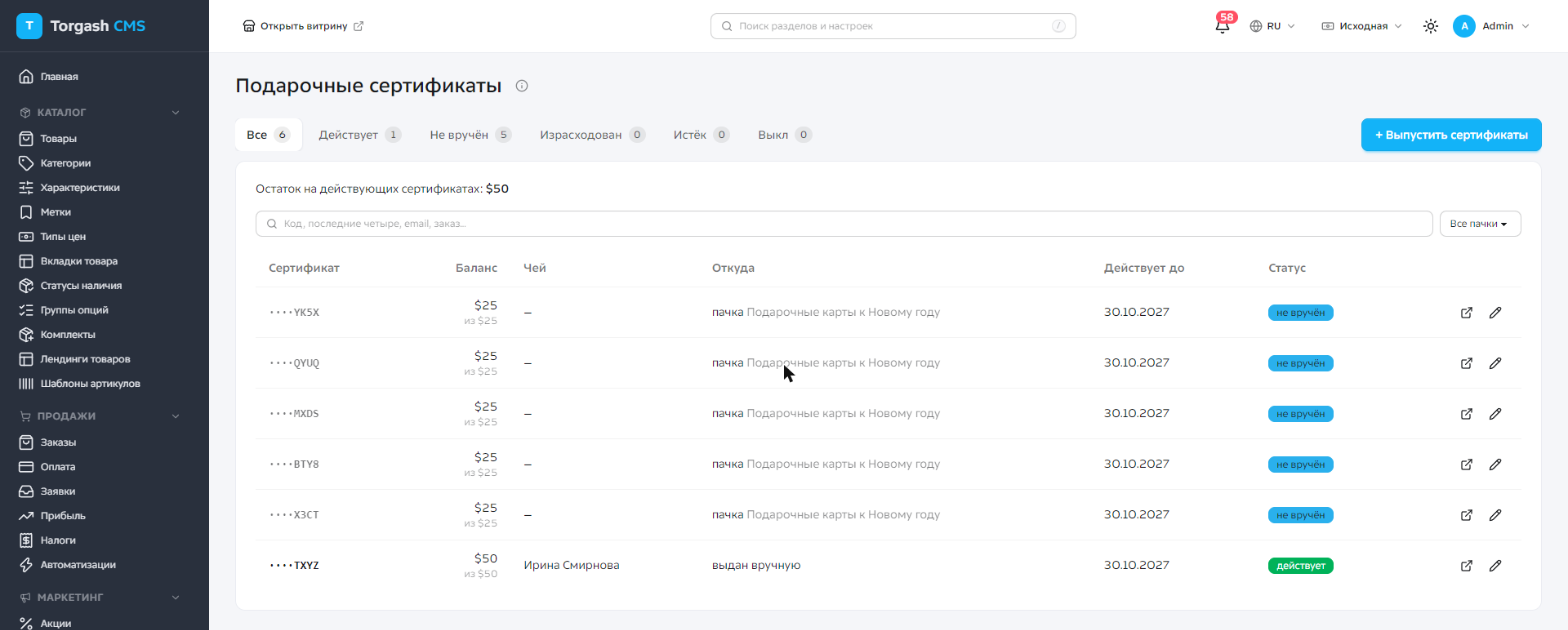
The tabs split gift cards by status: Active, Not handed over (from a batch, not activated yet), Spent, Expired, Off. Above the list — Still owed on working cards: what the shop owes its customers. Search by code, last four characters, email or order number.
Where a gift card comes from
Sold as a product
On the product’s card, the Gift card tab → This product is a gift card. The amount:
- the product’s price — different amounts are variations of one product;
- the customer types the amount — set the price to 0. The limits of the amount are in the module’s settings.
The customer can mark it as a gift and give the recipient’s name and email, who it is from, a message and the day to send it.
A card is issued when the order is paid: an unpaid order gives no working code. Every unit gets a card of its own, issued once, however the order changes afterwards.
Issued by hand
The Issue cards button → One card, for somebody.
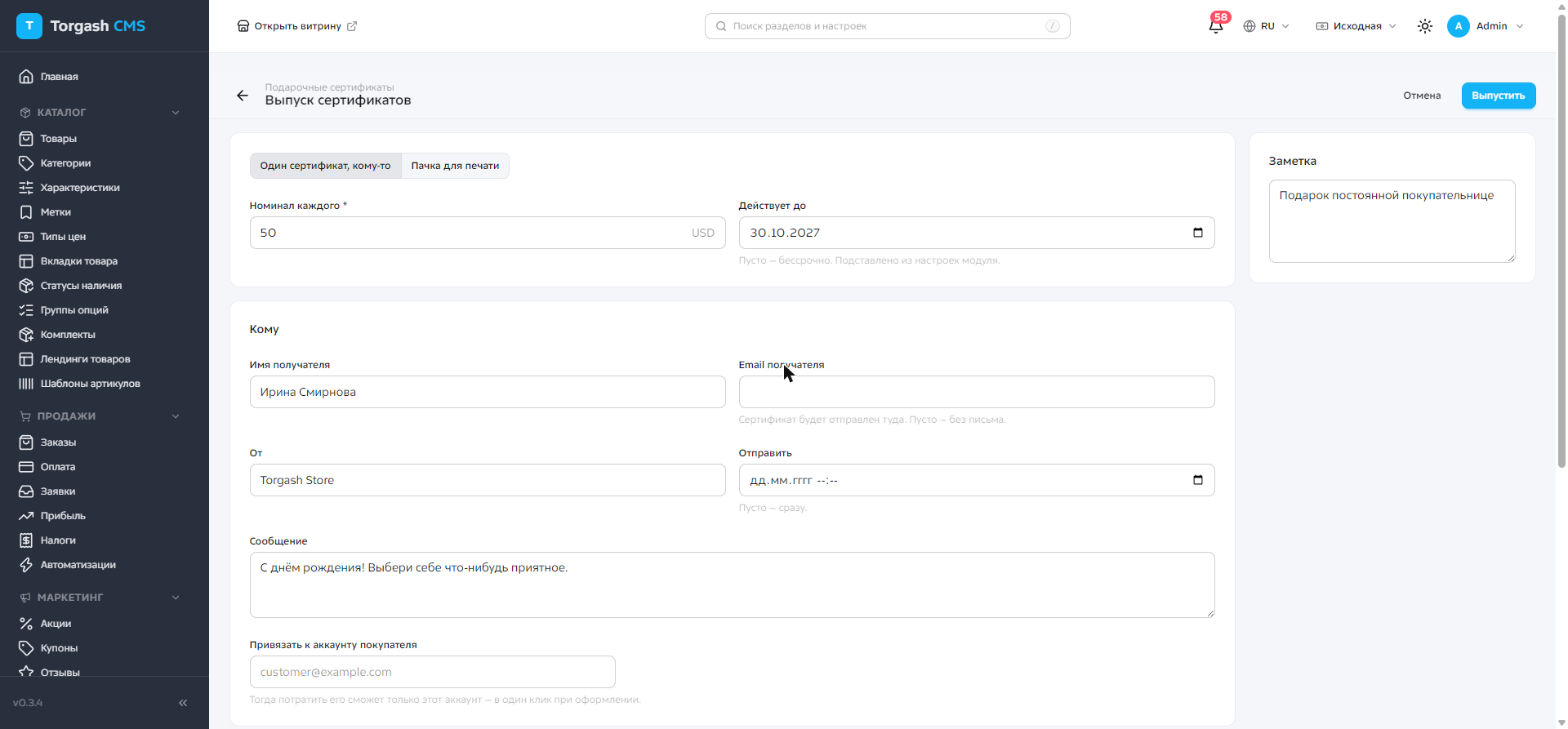
- Amount of each card and Valid until — the term comes from the module’s settings; empty — no expiry.
- Recipient’s email — the letter with the card goes there. Empty — no letter.
- Send on — the day and time of the letter. Empty — at once.
- Put it in this customer’s account — then only that account can spend the card, with one click at checkout.
- Note on the right — for staff; the customer does not see it.
A batch for printing
A batch for printing: how many, the amount of each and a batch name to find it in the list later. Cards from a batch are not money until a manager opens the one handed over at the till and presses Activate — handed over. A stolen box of printed cards is worth nothing.
The codes for the printer — Download the codes in the list, filtered by batch. For a partner who hands the cards out themselves, there is Active at once.
Paying with one
The code goes into the same box as a coupon: “Coupon or gift card?”. Case, dashes and spaces do not matter.
- An order can take several cards; the one that expires first is spent first.
- At checkout each card has Take no more than: the customer keeps part for next time.
- A customer can save a card to their account (Account → Gift cards). Then only that account can spend it, and at checkout its cards are offered as buttons.
Wrong codes are counted per visitor address: after ten in a quarter of an hour, even a right code has to wait.
Where it can be spent
On the card’s page and when issuing, the Where it can be spent block:
- Only for goods in these categories — subcategories included. None chosen — any goods.
- It may pay for delivery.
- At most, % of an order.
- On an order from — the smallest order.
Nothing set — anywhere, for the whole order.
After the order
- A refund goes onto the gift card first, up to what it paid. Only the rest goes back through the bank.
- A cancelled order — when the order moves into a status named in the settings, what the card paid goes back onto it by itself.
- A card bought by an order that was refunded in full is cancelled. What was already spent from it stays spent.
- A manager can pay a placed order with a gift card: the order’s payment card → Gift card code → Pay. It is taken off in the same place, and what it paid goes back onto the card.
Balance and history
A card’s balance is the sum of its history: issue, orders paid, refunds, corrections by hand, expiry. Correct the balance on the card’s page; the reason is required, and the customer sees it in the history.
Moving Valid until forward revives an expired card. The letter to the recipient can be sent again.
The module’s settings
Settings → Gift cards:
- A new card is valid for, months.
- Smallest and Largest amount a customer may type.
- A card may pay for delivery — the default for new cards.
- Put the money back onto the card when an order moves into — usually cancellation.
- Cancel a sold card when its order is refunded.
- A card may pay for another gift card.