The newsletter is two menu items: Marketing → Subscribers (who wants the shop’s news and offers) and Marketing → Campaigns (the letters to them).
Where people subscribe
- The “Newsletter subscription” block — goes into any zone: the footer, the home page. The theme’s look or your own HTML (see below).
- Under the cart — a small form. The setting Offer to subscribe on the basket page.
- At checkout — a “Subscribe to news and offers” tick. The order’s email is subscribed once the order is placed.
- In the customer’s account — a “Newsletter” switch.
The block’s own HTML
| In your HTML | What it is |
|---|---|
{form} | the field and the button — required |
{heading} {text} {button} | the block’s own words, in the visitor’s language |
{privacy_link} | a link to the privacy policy (a module setting) or nothing |
{subscribers} | how many people are subscribed |
Every shop placeholder works too: {shop_name}, {phone} and the rest. The HTML is written by staff allowed HTML in blocks.
Confirming and unsubscribing
Every new address gets a letter with a link and counts only after the link is followed. Without that, anybody can put somebody else’s address on the list, and mailing services and the law in many countries ask for the confirmation. A signed-in customer whose address is already confirmed is not asked again. The setting is Confirm every address by a letter.
The link opens a page with a button rather than confirming at once: mail services open the links in a letter themselves to check them, and such a check must not subscribe anybody. The letter’s text is in System → Letters, “Newsletter: confirm the subscription”.
The form is protected like the shop’s other forms: a trap for bots, a limit on attempts, a CAPTCHA if it is switched on.
Every campaign letter carries an “Unsubscribe” link — a page with a button, no sign-in. Order letters keep coming to someone who unsubscribed.
Subscribers
The list by status: subscribed, waiting for confirmation, unsubscribed. A search by address and where each one subscribed.
- Download CSV — exports what is on the screen, for an outside mailing service for instance.
- Import — addresses one per line, or as a CSV’s first column. They become subscribed at once, so upload only addresses whose owners gave consent elsewhere. Somebody who unsubscribed here stays unsubscribed.
A subscriber is in the personal data registry: exported together with the proof of consent (when, from which address, what was offered) and erased on request.
Campaigns
Marketing → Campaigns → a new campaign.
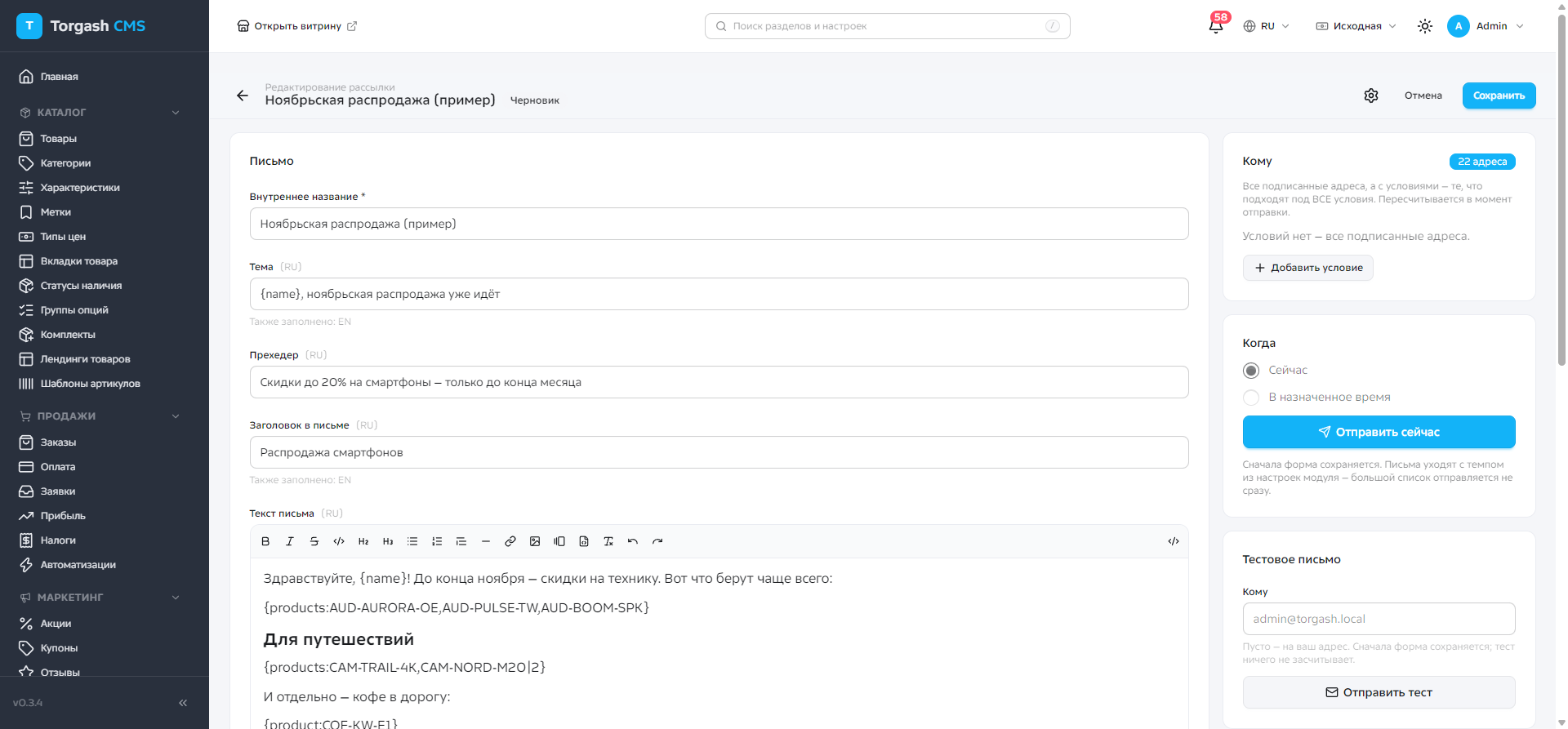
The letter
- Internal name — for you; the reader never sees it.
- Subject, Preheader (the grey line beside the subject in the inbox), Heading in the letter and the Text of the letter.
The letter goes out in the shop’s letter frame: the colour, logo and footer are set in System → Letters.
Texts are written in the content language chosen at the top of the admin; switch the language and type the translation. Each reader gets the letter in their language: their account’s language if they have one, otherwise the language of the page where they subscribed. With no words in their language — the shop’s base language.
Placeholders in the text:
{product:SKU}in a paragraph of its own — a product card: picture, name, price and a button. A product the shop does not show is skipped.{products:SKU1,SKU2,SKU3}in a paragraph of its own — a grid of tiles, three in a row (two for two or four products;|2at the end sets the number). On a phone the tiles stack.{name}and{email}— the reader’s details. They work in the subject and the heading too.
Pictures, galleries and HTML blocks go in with the editor’s buttons once the campaign has been saved once.
Who gets it
No conditions — every subscribed address. With conditions — those that meet all of them:
- Language of the letters and Where they subscribed — the subscriber’s own details;
- Bought or Did not buy in the last N days;
- Bought with delivery to a town;
- Has points — at least N bonus points.
An order counts as a purchase unless it is cancelled, declined, merged into another or waiting for an online payment. The number of addresses above the conditions is recounted on every change and once more at the moment of sending.
Sending
- Send a test — one letter to your address or the one typed. It counts nothing.
- Now or At a time → Send now.
Letters go out in the background at the pace of the setting Campaign letters per minute: ask your mail server how many it allows. A server sent too many at once starts refusing.
A scheduled campaign can go back to a draft, a sending one can be stopped: letters already sent stay sent. Once sent, a campaign’s text does not change. The next issue is made with Duplicate.
The figures
A sent campaign shows Letters sent, Opened, Clicked, unsubscribed, Not delivered (each reader counted once) and which links were followed. Opens are counted by a picture in the letter: a mail program that does not show pictures counts as an open only when the reader follows a link.
What’s next
- Promotions — a promotion can have a page of its own to link from a campaign.
- Personal data — a subscriber’s consent and erasure.