Points are in Marketing → Bonus points. A customer earns points for an order and spends them in the cart as a discount. Only customers with an account have points. A guest sees on a product how many points they would get with an account.
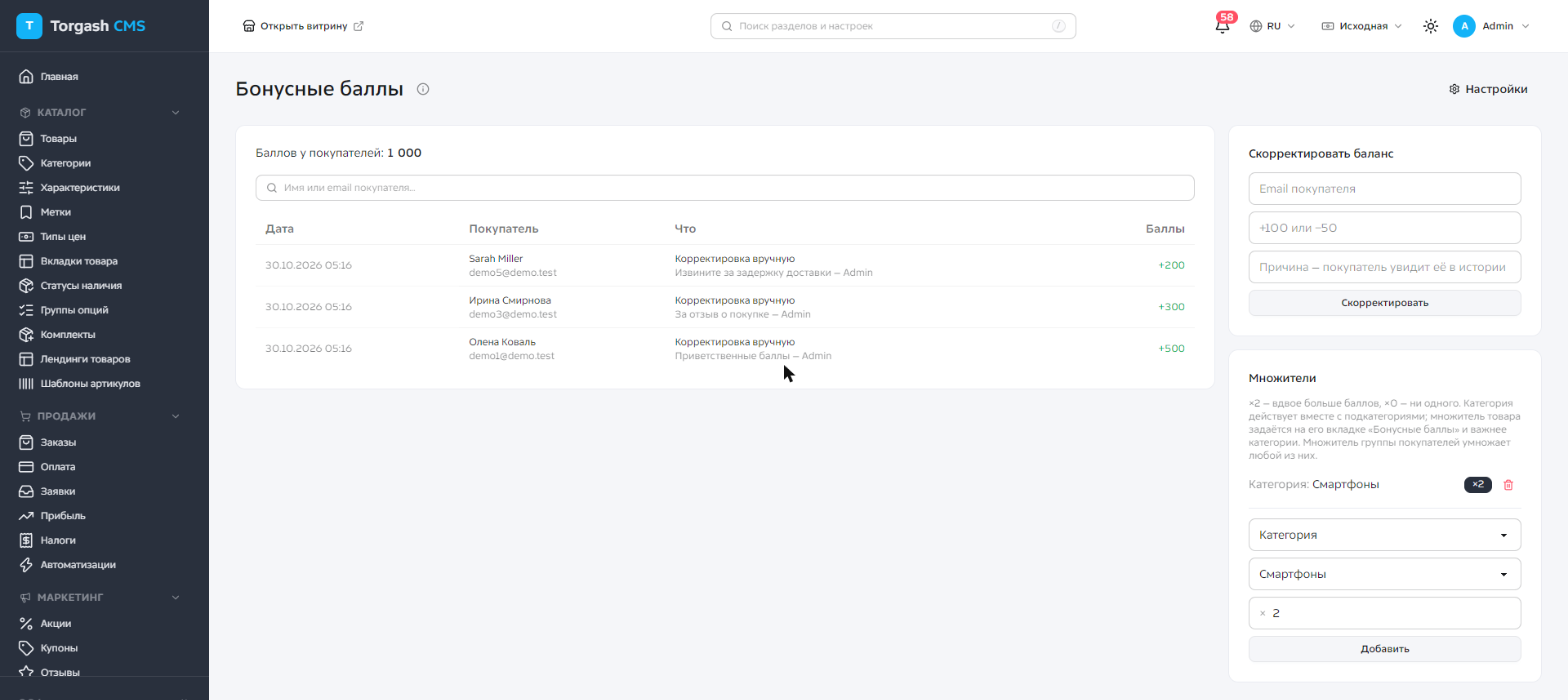
On the left — Points customers hold (the total on all accounts) and the log of every award and spend, searchable by the customer’s name or email. On the right — correcting a balance and multipliers.
Earning
Settings → Bonus points:
- Points earned and For every, in the shop’s currency — “1 point for every 100”: an order of 2,450 earns 24 points. Counted from the goods after every discount, without delivery.
0points — nothing is awarded, but points can still be given and spent by hand. - Earn only on what was paid with money — the part of an order paid by a gift card earns no points: it was paid for once already.
- Credit the points when an order moves into — “Complete” by default. Until then the customer sees the points as pending.
- Take the points back when an order moves into — usually cancellation. What the order earned is taken back, what was spent on it is returned. A refund also takes its share.
Multipliers
On the right of the points screen. ×2 — twice the points, ×0 — none.
- Category — subcategories included: “×2 on smartphones”.
- Customer group — “×0 for wholesale”: they earn no points.
- Product — a multiplier of its own on the Bonus points tab of the product’s card.
A product’s multiplier beats its category’s. A group’s multiplier multiplies whichever of them applies.
Spending
In the cart and at checkout the customer sees “Bonus points — you have 540”, types how many to spend (the hint says “up to 270”) and presses Apply.
- One point is worth, in the shop’s currency — how much one point takes off.
- Spend at least, points —
0: any number. - Points may pay at most, % of the goods — half by default. Delivery cannot be paid with points.
- Points can be spent together with a coupon — off: an order takes either a coupon or points.
Points are taken off after the coupon and lower the tax the way a coupon does. On the order they print as a discount line.
Points live for, months — counted from the day they were awarded. The oldest are spent first; the rest expire by themselves. 0 — forever.
Correcting by hand
The Correct a balance block: the customer’s email, +100 or -50, and a reason. The reason is required; the customer sees it in their history. The same is on the customer’s card, along with the balance and the latest movements.
That is how welcome points are given, an apology for a late delivery, a thank-you for a review.
What the customer sees
- Account → Bonus points — the balance, pending points and every movement.
- On a product’s card and page — “+N points” for buying it. The setting Show “+N points” on product cards and pages turns it off.
On the order’s payment card: how many points were spent and how many the order will earn. A manager can change that number.
Prices in points
Switched on by the Prices in points setting. Then a product’s Bonus points tab gets a price in points. The storefront prints it under the regular price: “or 1,500 points”. In the cart, the customer presses the coin button on the line and buys it entirely with points.
What’s next
- Customer accounts — the points balance on the customer’s card.
- Coupons — whether points can be spent with a coupon.