Promotions are in Marketing → Promotions. A promotion lowers the price by itself; the customer types nothing. A discount by code is a coupon.
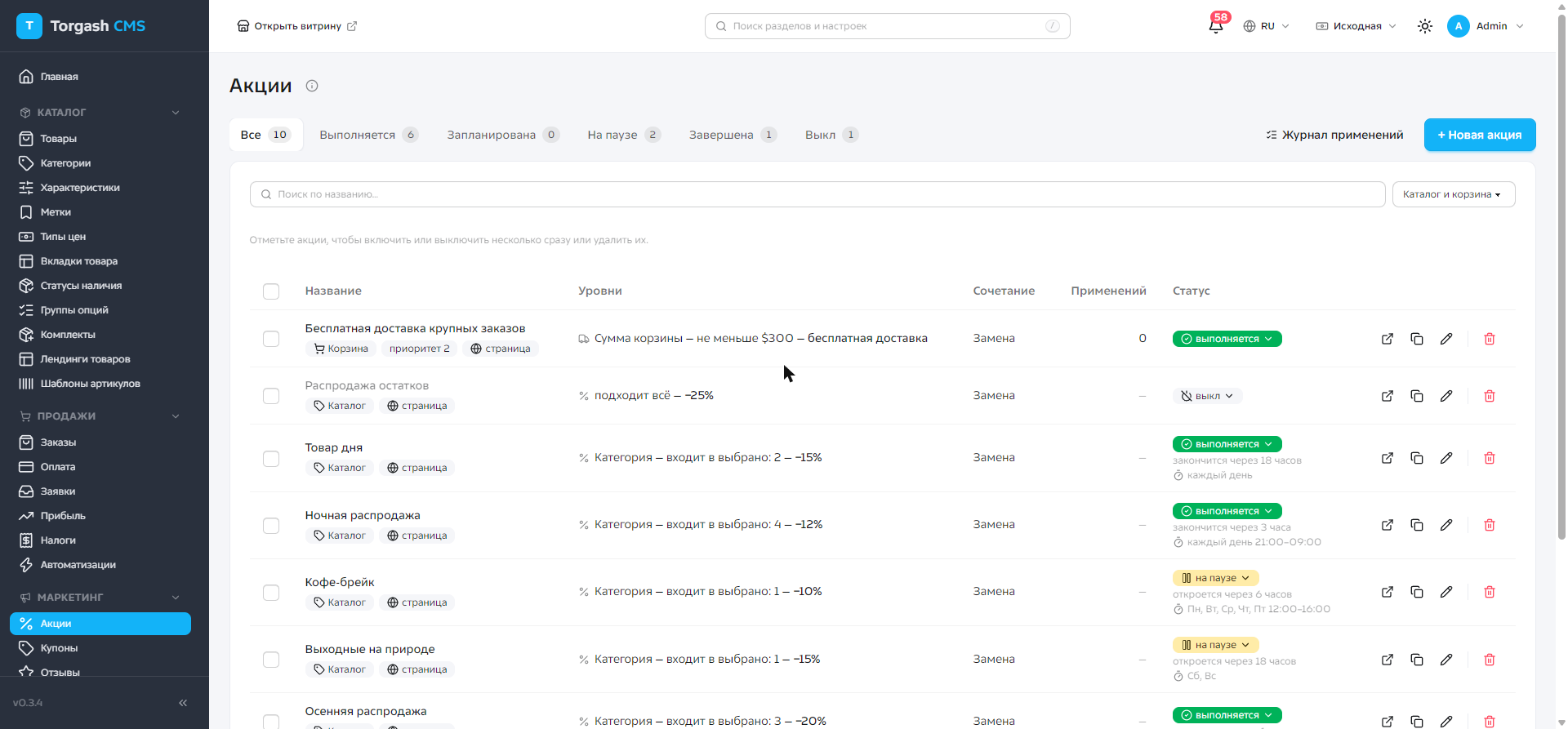
The tabs above the list split promotions by status:
- Running — enabled, and today is inside its dates.
- Scheduled — enabled, but not started yet.
- Paused — its dates are on, but it is outside its hours right now (see Schedule). Under the status: when it opens again.
- Ended — the end date has passed.
- Off — switched off.
The status is changed right in the row. Tick several promotions to switch them on, off or delete them at once.
Zone: the product’s price or the order
The zone is chosen when a promotion is created and does not change afterwards.
- Catalog — changes the product’s own price. The storefront prints the new price, the filter sorts by it, the cart takes it. The old price is shown struck through.
- Cart — takes money off the order: a discount off the total, free shipping, a gift product or moving the customer into a group. The product’s price in the catalogue stays as it is.
Tiers
The discount is set on the Tiers tab. A tier is conditions plus a discount. Tiers are tried top to bottom, and the first one that matches wins.
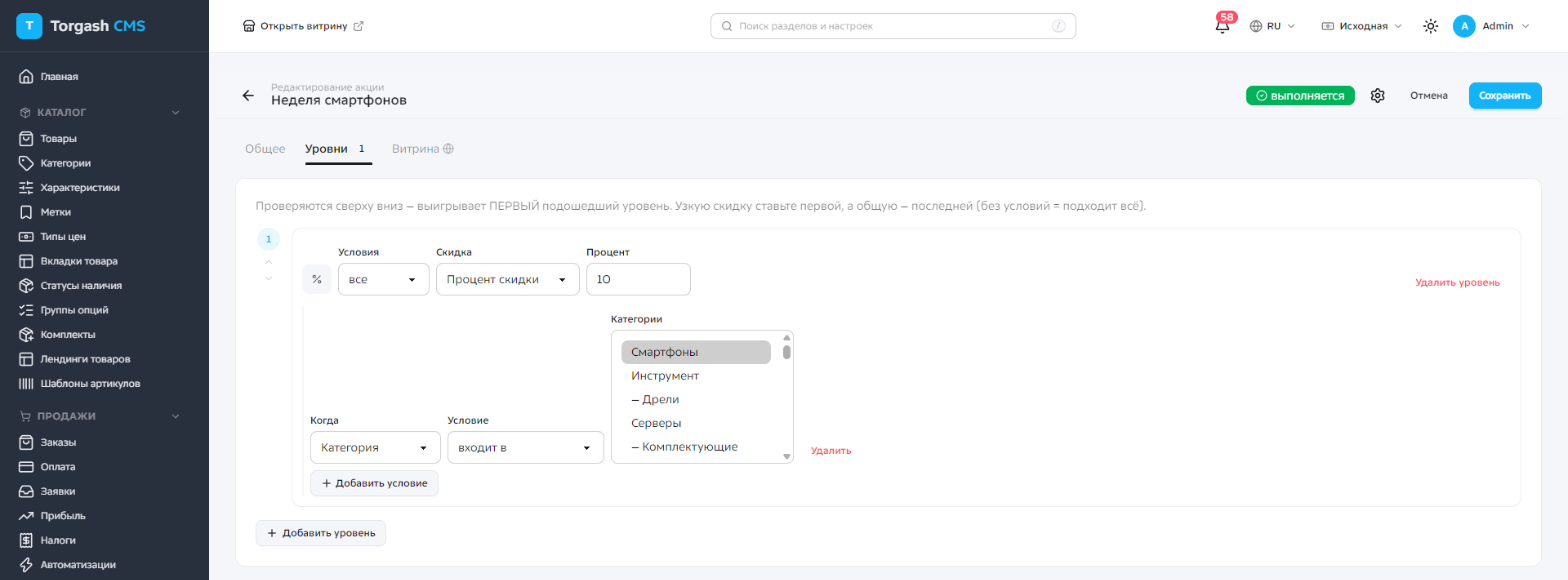
“10% off everything, but 25% off smartphones” is one promotion with two tiers: smartphones first, “everything” last. A tier without conditions matches any product, so the general one goes at the bottom. The arrows left of the number move a tier.
Match — all (every condition of the tier must hold) or any (one is enough).
Catalog zone conditions: category, product, feature, the product’s price, customer group. Cart zone conditions: cart subtotal, item count, an item from a category in the cart, a particular product in the cart, customer group, payment method.
Discount:
| Kind | What it does |
|---|---|
| Percent off | Takes N% off. |
| Fixed amount off | Takes an amount off. |
| A percent of the original price | The price becomes N% of what it was. |
| A fixed price | The price becomes this: “everything for 999”. A product cheaper than 999 keeps its price; there is never a markup. |
The cart zone also has free shipping, free gift product (by SKU) and give customer group.
Combining with other promotions
When two promotions match the same product or the same cart, the Combine with others field on the General tab decides:
- Replace — the default. Of the matching Replace promotions, one applies: the one with the highest priority.
- Stack (add) — its discount is added to the one already applied: 10% + 10% = 20%.
- Stack (multiply) — its discount is taken from the already reduced price.
However many discounts add up, an order can become free, but never less than zero. Free shipping cancels the shipping once, however many promotions grant it.
The order in the cart
- Products at the price the catalog-zone promotions gave them.
- The coupon.
- Cart-zone promotions — from what is left after the coupon. 50% off with a 40 coupon takes half of the rest, not half of the receipt.
- Shipping, tax and fees.
Dates and limits
Starts and Ends — an empty field means “no limit on that side”.
Applies when — on which storefront and to which visitors the promotion runs. No conditions — everywhere, to everybody. Which products get the discount is the tiers’ business, not this field’s.
The cart zone has limits:
- Usage limit — how many orders in total can get the discount.
- Once per customer — exact for customers with an account. A guest is recognised only when the order is placed, so a guest still sees the discount in the cart while the order will not get it.
How many times the promotion was taken, and by which orders, is in the Usage log (the button above the list).
A gift and a move into a group happen only when an order is placed, never when the cart is recalculated. A gift that is out of stock — the order goes through without it.
A placed order remembers its discounts. Editing or deleting the promotion later does not move a single figure on it. Only a manager changing what the order contains recalculates the discount.
Schedule: deal of the day
The Repeats block on the General tab opens the promotion only at certain hours inside its dates:
- no days ticked — every day;
- an end before the start — the window crosses midnight:
22:00 → 02:00is a night sale; - the same time twice (
00:00 → 00:00) — the whole day; - there can be several windows.
Outside a window the promotion is paused: enabled, but at full price. The time is the shop’s clock.
The promotion’s page
The Storefront tab → Give this sale a page. The page has its own address for a newsletter or a banner, the name, your description of the terms and a countdown. A catalog-zone promotion’s page lists the products the discount applies to by itself.
- The page outlives the promotion: an old link from a newsletter shows “The sale has ended”, not “not found”. The page goes only with a deleted promotion.
- Every running promotion is collected at
/saleand goes into the sitemap. A menu link is added by hand. - Show a countdown — counts to the end of the promotion or the close of the current window, whichever is first. A paused promotion shows no timer.
On the product page, under the price, it says which promotion the price comes from, with a link and the countdown. On a product card the timer appears among the labels on the photo. The module setting Countdown on product cards turns it off.
What’s next
- Coupons — a discount by code.
- Groups and prices — a customer group’s standing discount, not a promotion.