Returns are under Sales → Enquiries with the kind “Return or exchange” (the returns module). A return is a conversation with the customer, tied to an order, with money and stock that move on your actions.
How a return appears
A customer with an account opens the order in their account and presses Return or exchange: picks the lines, the quantity and the reason, writes a message, attaches photos. A guest writes through the enquiry form, and the manager opens the return by the order number.
The return’s panel
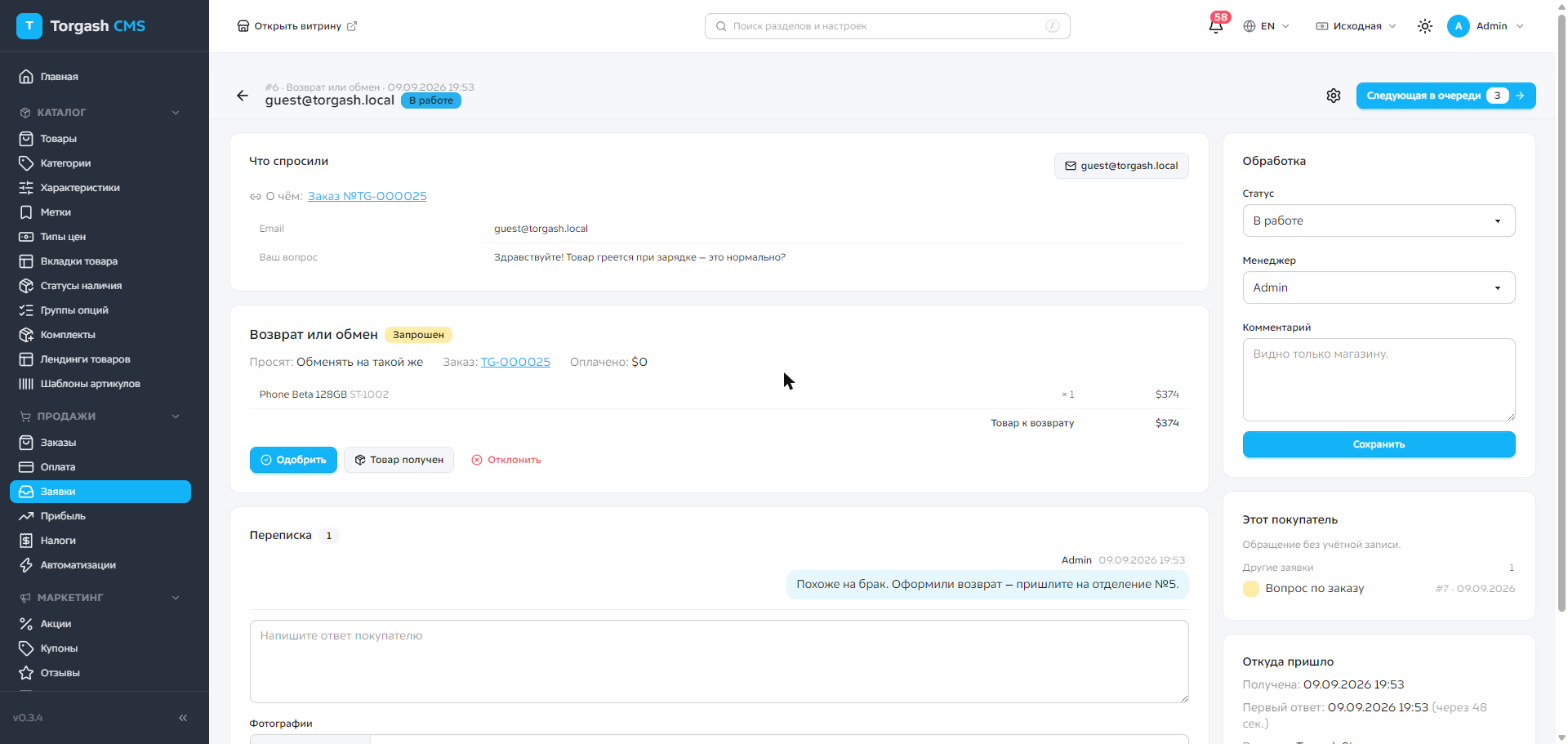
At the top: what is asked (a return or an exchange), the order, the amount paid, the goods going back. Below, the conversation: every message of the manager goes to the customer by e-mail, their answers come here.
The actions, in order:
- Approve — write how to send the goods back; the text goes to the customer. Or Decline with a reason: a refusal with no reason is what makes people ring instead of read.
- Goods received — where they arrived (a customer returns to the nearest shop, not the one that shipped) and what happens to them: back into stock or written off (a warranty case: the item goes to the manufacturer or the bin, and stock must not gain one).
- Refund the money — the amount goes back the way it was paid, where the payment system can, otherwise it is marked refunded by hand. The order’s payment state becomes “refunded” or “partially refunded”.
- Create the exchange order — a new order for the same goods on the customer’s behalf, delivered to the same address, with the same payment method; the return links to it.
What’s next
- Orders and statuses — the order the return is about.
- Enquiries and forms — the Customers section.