Taxes are under Sales → Taxes (the taxes module). A shop without it simply counts no tax: the price on the shelf is the price.
How a tax is charged
The main choice of every tax is how it is charged:
- Included in the price — the price on the shelf is what the customer pays; the tax is extracted from it for the cart, the order and the invoice. VAT in Europe and the CIS works so.
- Added at checkout — on top, the customer sees the price grow in the cart. Sales tax in the US works so.
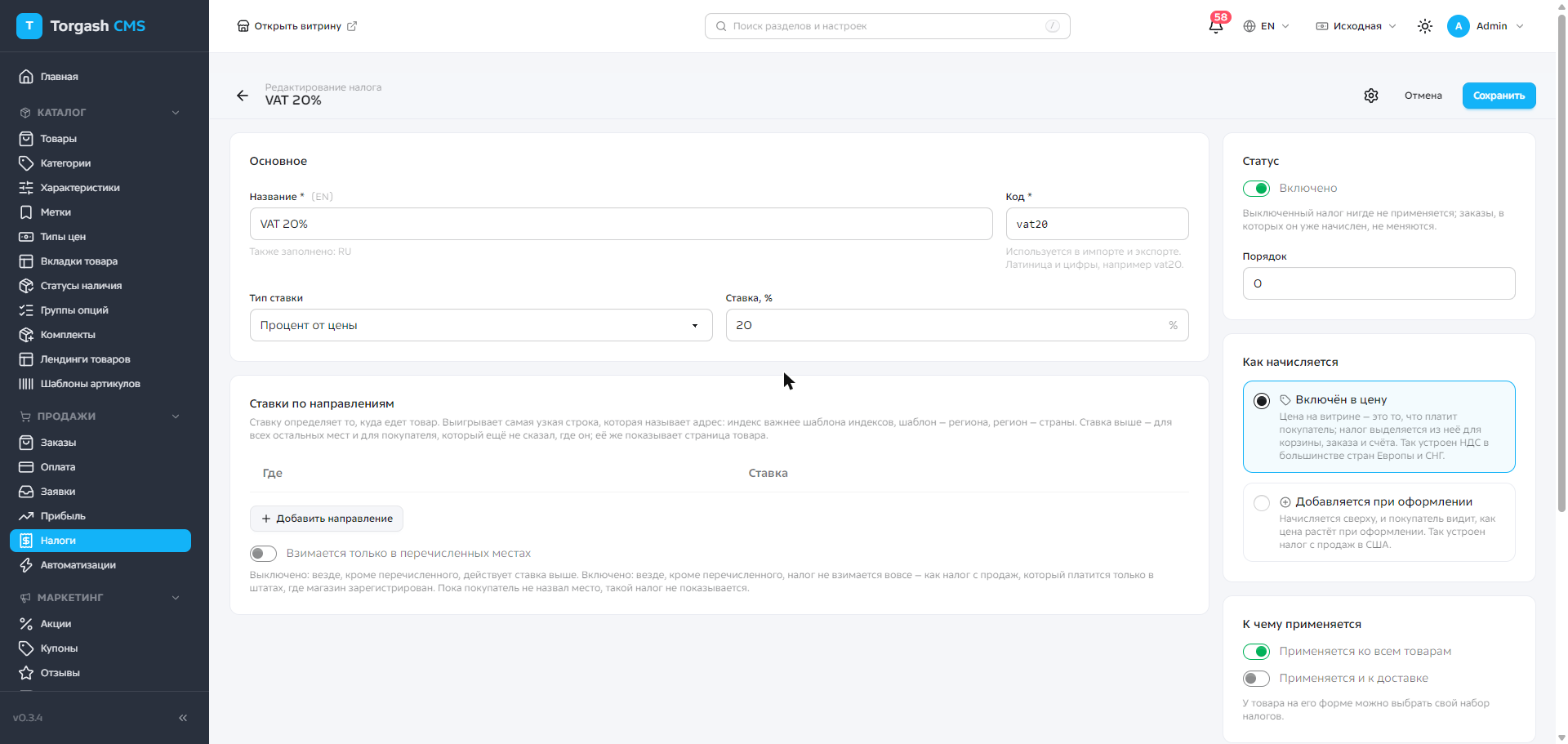
The tax’s card
- Name and code — the code is used in imports and exports:
vat20. - Rate type — a percent of the price or a fixed amount per item.
- Rate — the main one, and rates by destination: another rate for another delivery country or region. “Charged only in the places listed” — for a tax that does not exist elsewhere.
- What it applies to — every product (a product can override it on its own card) and, apart, shipping.
- Status and sort order. Disabling a tax stops it applying without touching the orders that already charged it.
The tax on an order
At checkout an order freezes its tax: the rates, the amounts per line and on delivery. Changing a tax later does not change old orders; editing an order’s items recounts its tax by the snapshot, not by the current settings. The invoice shows the tax as a line of its own.