Every product, category, brand and page has an SEO tab on its own card. These are properties of the page itself, not of a module: they go into an export, come through the API and stay in place if the SEO module is removed.
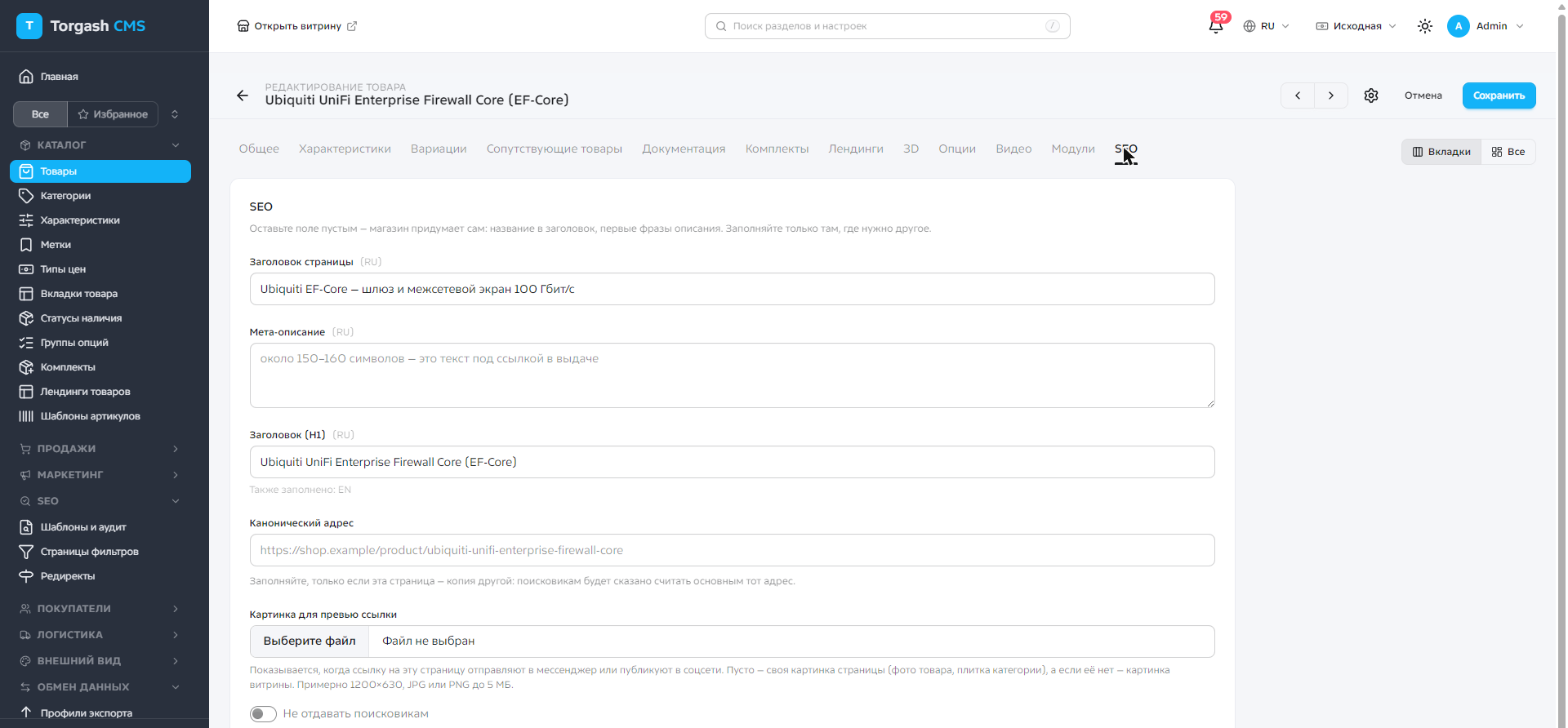
Leave a field empty and the shop works it out: the name into the title, the first sentences of the description into the meta description. Fill in only where something else is wanted. Each field is written in one content language, the one chosen at the top of the admin; the note “Also filled in: EN” under a field says the text exists in another language already.
- Page title — what the browser tab shows and the blue line of a search result. Empty — the product’s name.
- Meta description — the text under that line, about 150–160 characters. Empty — the first sentences of the description.
- Heading (H1) — the heading on the page itself, when it should differ from the name.
- Canonical address — fill in only when this page is a copy of another: search engines are told to treat that address as the main one. In grey, the page’s own address.
- Picture for the link preview — shown when a link to the page is sent to a messenger or posted on a social network. Empty — the page’s own picture (the product’s photo, the category’s tile), and failing that the storefront’s. About 1200×630, JPG or PNG up to 5 MB.
- Keep out of search engines — the page stays reachable by link but enters no index and is left out of the sitemap.
The home page’s words belong to the storefront: System → Storefronts → Home page, with its picture for shared links.