Templates live under SEO → Templates & audit, the Templates tab. One template writes the title, the meta description, the H1 and the photo captions for every product, category, brand, page, article or filter page at once.
The list of templates
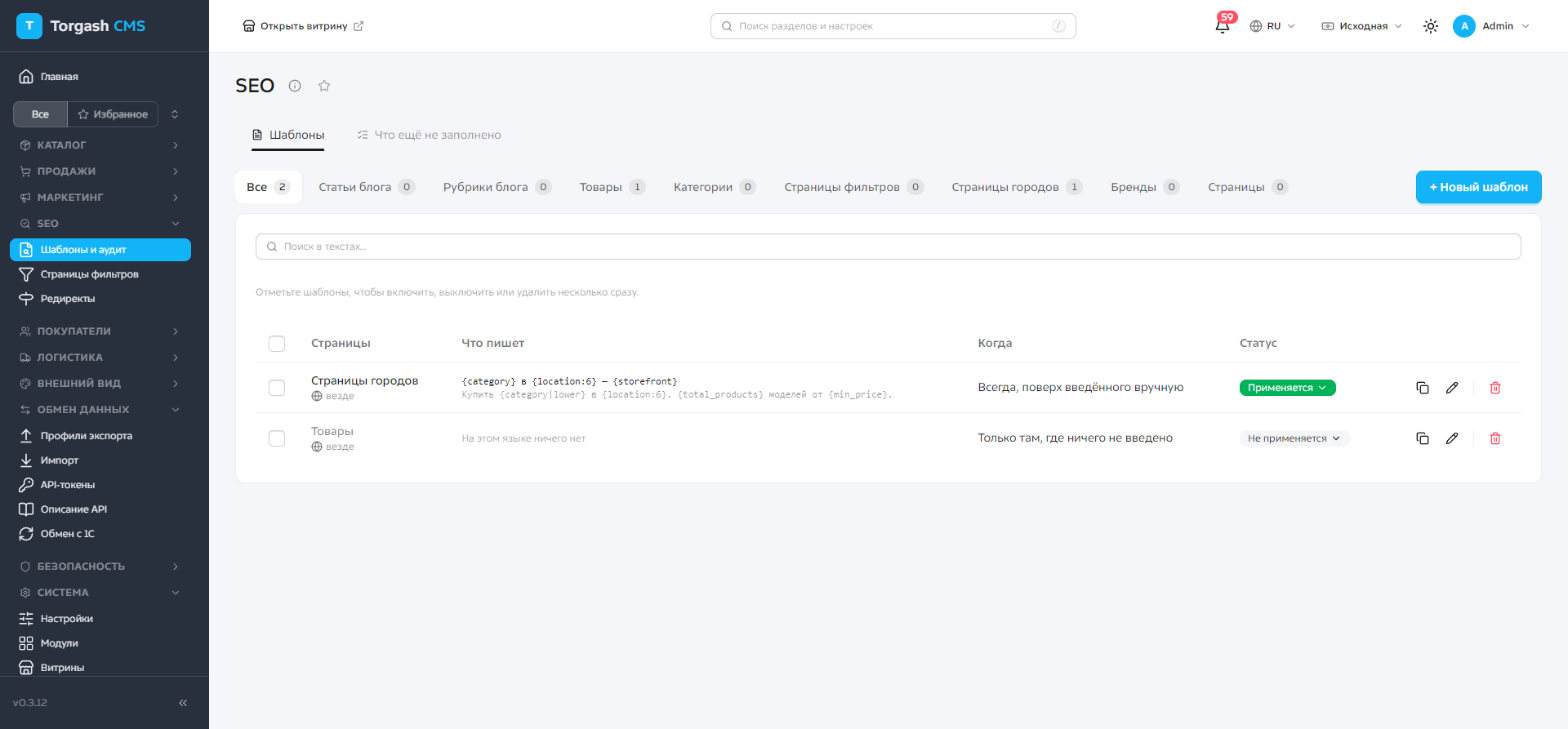
The tabs above the table are the kinds of page with counts: blog articles and rubrics, products, categories, filter pages, city pages, brands, pages. Which kinds exist depends on the modules installed.
In a row:
- Pages — the kind of page and where the template applies: “everywhere” or one category “and below”.
- What it writes — the template’s title and meta description in the current content language. “Nothing in this language” means the template is written in another one.
- When — only where nothing is typed in, or always, over what is typed in.
- Status — switched right in the row.
On the right: duplicate, edit, delete. Tick several templates and the bar below switches them on or off or deletes them at once.
The template form
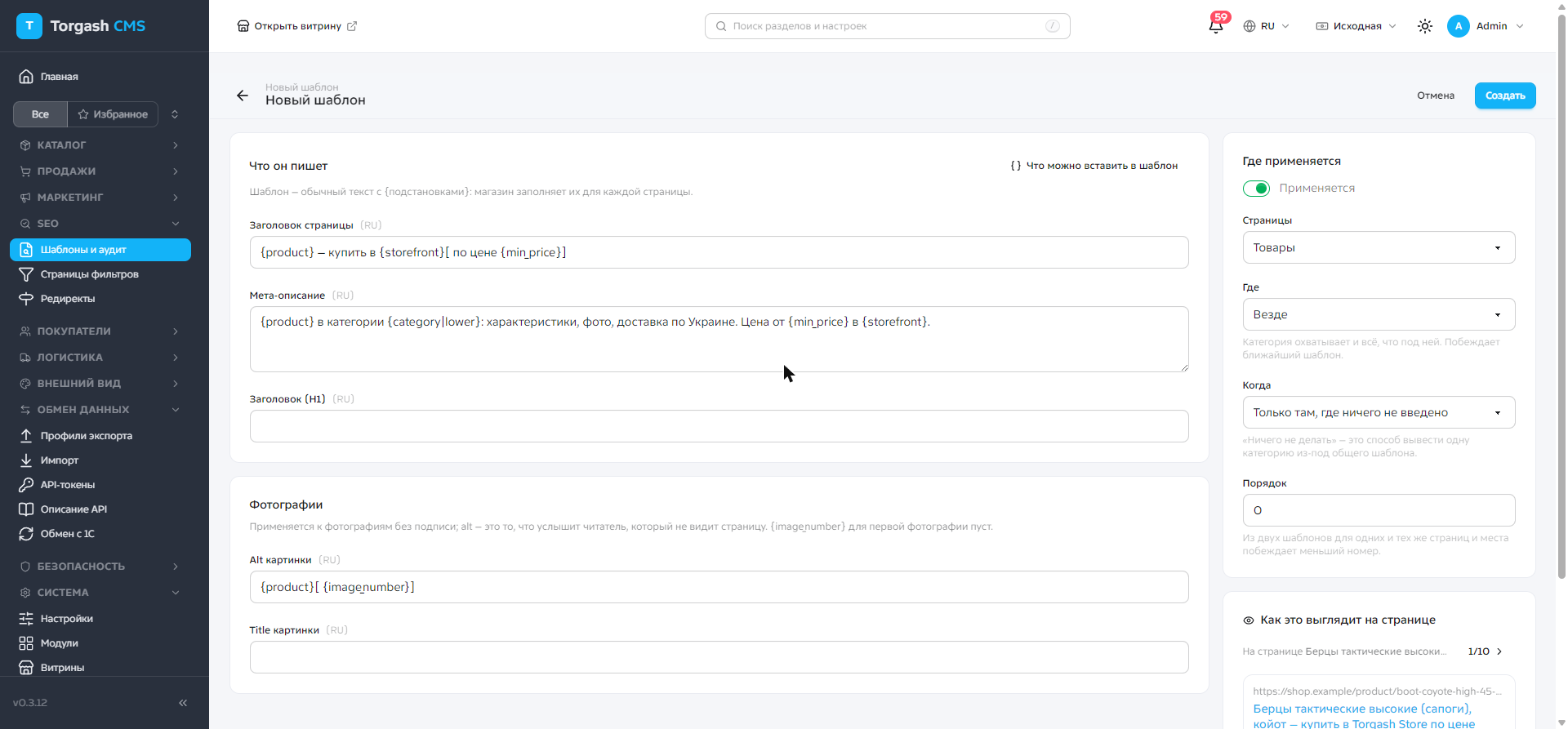
What it writes
A template is ordinary text with placeholders in curly braces. The shop fills them in for each page.
- Page title — what the browser tab shows and, as a rule, the blue line of a search result.
- Meta description — the text under that line. About 150–160 characters.
- Heading (H1) — the heading on the page itself, when it should differ from the title.
Each field is written in one content language, the one chosen at the top of the admin; the language code stands beside the field’s name. Saving the Russian text does not erase the Ukrainian.
The link What you can put in a template above the fields opens the full list of placeholders. The main ones:
{product},{category},{category_path},{brand},{storefront},{currency};{min_price},{max_price},{total_products}— for categories and filter pages;{feature:code}— one characteristic of the product by its code, say{feature:ram_gb};{location}— the town on a city page.
Two things worth knowing:
|lower,|upper,|ucfirstchange the case:{category|lower}gives “laptops”.- Square brackets around a placeholder vanish together with their text when the placeholder is empty.
{product}[ — {feature:color}]prints the dash only when the product has a colour, and never ends up as “Laptop — “.
A placeholder that does not exist stays on the page as written: a typo is visible rather than turned into nothing.
Photographs
Image alt text and Image title apply to photographs nobody has captioned in the gallery. A caption typed by hand is always stronger, unless the template is in the “always” mode. {image_number} is blank for the first photograph, so {product}[ {image_number}] gives “Laptop”, “Laptop 2”, “Laptop 3”.
Where it applies
- Applied — a switched-off template is kept but writes nothing.
- Pages — the kind of page.
- Where — everywhere or one category. A template for a category governs everything under it too, and the nearest one wins: a rule for “Laptops” beats the shop-wide one, a rule for “Gaming laptops” beats both.
- When — only where nothing is typed in (the default: what a person wrote stays), always, over what is typed in (for a catalogue whose imported titles are worse than the template) or do nothing here. The last mode takes one category out from under a shop-wide rule.
- Position — between two templates for the same pages and the same place, the lower number wins.
How it looks on a page
Bottom right, a preview on a real page of the chosen kind: the address, the title and the description the way a search engine will show them, with the length of the title and of the description. The arrows page through, so you see how the template lands on different products. A red length is text longer than a search engine usually shows.